
StoryDeck Review
Turn One Page Of A Book Into A TikTok Storytime Carousel, And What To Know Before You Post
Why I Looked Twice At A Carousel Maker For Books
Scroll BookTok for ten minutes and a pattern jumps out. The posts that stop your thumb aren’t cover reveals. They’re little stories. A wife who stopped telling her husband things, a daughter who overheard her mother, ten slides of someone’s rough week, and then, near the end, a photo of a book page with one line underlined.
Nobody feels sold to. That’s the trick.
It’s also a pain to make. You need a hook, a story with believable details, slides short enough to read on a phone, a photo of your page, a cover, a caption and a pile of hashtags. By hand, that’s an evening for a single post.
StoryDeck tries to shrink that evening to a few minutes. Thu Thao launches it on November 12, 2026 on WarriorPlus, and the front end is a $17 one-time launch price that climbs a dime with every sale.
I like the idea. I’m also a little wary of it, because a tool that writes emotional first-person stories raises real questions about honesty, platform rules and book copyright, and a loud sales pitch can bury those questions.
So this StoryDeck review covers what the app does, how its four steps run, what the five upgrades and the Pro Lite downsell cost, how the refund policy really works and where the claims need a reality check. No income or view numbers appear anywhere below, and that’s deliberate.
StoryDeck Quick Facts

| Detail | Information |
|---|---|
| Product | StoryDeck |
| Vendor | Thu Thao |
| Launch | November 12 to 17, 2026; the cart opens at 9:00 AM US Central on November 12 |
| Sold through | WarriorPlus |
| Sales Page | https://storydeck.novaaiplatform.com/ |
| Category | AI content tool for book promotion on TikTok |
| Type | Web app with an email login after checkout |
| Front-end price | $17 one-time launch price, rising 10¢ with every sale up to $27 |
| Upsells | Five, from $27 to $97, plus a $27 downsell on the first; one is a monthly plan |
| Refund | Sales are final, with an exception for technical problems the vendor can’t fix |
One Page Of A Book, Turned Into A Swipeable Story
Imagine a small studio that takes one underlined sentence from your book and builds a story around it.
StoryDeck is a web app for authors and book affiliates that turns a single book page into a faceless storytime carousel for TikTok Photo Mode. Each carousel follows four beats. First comes a hook, one or two lines meant to make a viewer swipe. Then comes a short first-person story, written so your book lands at the turning point. Next you see a real photo of the page with your line highlighted, and the last slide shows the cover.
You pick the book, you pick one of six story frames, and you click write. The AI writes the story and picks background photos, and you edit anything you like and download the slides as a ZIP.
There’s no camera, no voice and no video editing. It’s photos and text.
What StoryDeck doesn’t do matters as much. It doesn’t post for you, since there’s no scheduler. It doesn’t promise views or sales. And it works best for books with one sentence worth underlining, so picture books, cookbooks and workbooks are weaker fits.
How It Compares With A Chatbot Plus A Design App
You could build these posts yourself. Ask a chatbot for a story, paste the slides into a design app, hunt for photos, snap your page, write a caption. Plenty of people do exactly that.
Here’s where StoryDeck takes a different road.
The frames are built for this format. Instead of a blank prompt box, you start from six story shapes, each with its own beats and hook ideas.
It uses your real page. The slide shows a photo of the actual page with your line highlighted, or a typeset version if you have no paperback. That beats an AI-drawn page full of invented words.
It handles slide length. Lines are kept short enough to read on a phone screen.
It writes the caption. A TikTok caption with hashtags comes with every story, and a note saying the story is fiction.
It exports in the right shape. Nine-by-sixteen slides in a single ZIP.
A general chatbot and a design app are more flexible, though. If you already have a smooth routine, you may not need a dedicated tool. StoryDeck is a shortcut for one specific kind of post, and that’s all.
Meet Thu Thao
Thu Thao is the maker of StoryDeck and writes the sales page as a personal letter about noticing how story posts sell books on BookTok, a YouTube channel under the name Thu Thao, KDP AI Tools carries the same name, and the page shows two TikTok accounts it says are unaffiliated, admits that their results aren’t typical and includes an earnings disclaimer, while the affiliate page promises no income claims, no fake timers and no fake testimonials, so the style is more restrained than most launches, though I’d still judge the product by a first week of real use and not by tone.
What’s Inside The $17 Starter
Here’s the front end in plain terms.
What You Get
- Six story frames. The shapes behind the storytime carousels you see on BookTok, each with its own beats and hook ideas.
- An AI writer for the format. Hook first, short slides, your book at the turning point.
- Your real book and page. Add the title, your Amazon link, a cover photo and a page photo, then mark the line with the in-app highlighter.
- Typeset fallback. No paperback? The app typesets the page and draws a cover.
- Background photos for every story. Picked for the story and swappable in a click.
- A slide editor. Change any line, font, text style or background.
- TikTok caption and hashtags. Written with each story, with the fiction note.
- Nine-by-sixteen slides in a ZIP. Ready for TikTok Photo Mode.
- 50 AI generations. One-time, then your own OpenRouter key.
What The Starter Doesn’t Include
The vendor lists its limits plainly, and I appreciate that.
- One book only. Rotating several books needs an upgrade.
- English only.
- TikTok sizes only. No Instagram, Facebook or Pinterest sizes.
- No video. You get slides and a ZIP.
- No ready-made stories. You write every story with the AI.
- No client workspaces.
You can add any of these after checkout, one at a time, and I’d only add one when a real limit gets in your way.
From Book Page To ZIP, In Four Steps
Here’s the flow in the order the app runs it.
Step 1: Add your book
I enter the title, my Amazon link, a photo of the cover and a photo of the page with the line I love, then mark that line with the highlighter right in the app. No paperback? StoryDeck typesets the page and draws a cover for me.
Step 2: Pick a story frame and click write
I choose one of six frames, each with its own beats and hook ideas, and click write. The AI produces a first-person story with my book at the turning point, and I go through the hook and story slides in the Story tab. Every click gives me a new story.
Step 3: Make it yours
In the Design tab I change any line, font, text style or background, and swap the photo with one click. If a stock photo shows a face, I cover it with a heart sticker.
Step 4: Download and post
I download the 9:16 slides and a TikTok caption with hashtags in one ZIP. Then I post them in TikTok Photo Mode with my Amazon link in my bio.
Want a deeper understanding of the platform? Watch the demo video below:
The Six Story Frames, Explained
The frames are the heart of the tool. Each is a different way into the same page.
- The careless sentence. Someone says something without thinking, and the cost shows up later.
- Overheard the truth. A character learns something by accident through a conversation they weren’t meant to hear.
- The package after the mistake. Something arrives, a message or an object, after a decision went wrong.
- Alone in an emergency. A character faces a hard moment without the help they expected.
- Flip the point of view. The story shows a familiar conflict from the other side.
- Grief with a deadline. A loss runs into a time limit.
Notice what they share. Every frame starts with a human problem, and the book arrives as the thing that understood it. That structure, not the AI, is the product’s real asset.
My advice: don’t run all six on one page in a single week. Pick the frame that suits your book’s mood, a romance with an overheard conversation, a self-help title with a careless sentence, and save the rest for later posts.
Making Each Post Feel Different
Six frames share a shape, and that’s both the strength and the risk. Viewers who see the same arc three times in a row start to scroll.
So give every post something that’s yours. A few small moves go a long way.
- Change the hook by hand. The first slide decides everything, and the AI’s first draft is a draft. Rewrite it in your own voice, with a detail only you would use.
- Vary the frame. If Monday’s post used an overheard conversation, try a careless sentence on Thursday.
- Edit the middle. Cut any line that sounds like every other story you’ve read, and add one specific, small detail. A cold cup of tea does more than a vague feeling.
- Swap the photos. The app lets you search for another, shuffle, upload your own or pick a plain color, so use that to keep the feed from looking uniform.
- Rotate the design. Fonts, text styles and backgrounds are all editable, which means a week of posts can look related without looking identical.
- Space them out. Three similar posts on one day read as spam, while the same three across a week read as a series.
None of this takes long. A few minutes of editing is what turns an AI draft into something with your name on it, and it’s also where viewers decide if you’re worth following.
Choosing The Line That Carries The Story
StoryDeck can write a story. It can’t choose a good line for you.
The line is the turning point, so it deserves care. A strong one is short, emotional and complete on its own. It tells a stranger something true about regret, courage, loneliness or hope without needing the paragraph around it.
Weak lines, on the other hand, depend on context. A recipe step, a plot detail or a character name that means nothing to someone who hasn’t read the book will leave a viewer cold.
Here’s how I’d choose.
- Read your book looking for a sentence a stranger would underline.
- Say it aloud. If it needs explaining, skip it.
- Imagine the story that would lead to it. Someone should need that sentence at that moment.
- Check the rights. For your own book, you hold them. For someone else’s, see the copyright section below.
- Photograph the page in good light. A shadow or a crooked angle makes slides look careless.
One line, one story. That’s the format.
Who This Suits, And Who Should Pass
It isn’t for everyone, and the page admits that.
Authors With A Book On Amazon
If you’ve posted a cover with link in bio and watched it sink, this gives you a different kind of post. It won’t replace a good book or a good blurb.
Book Affiliates
If you recommend books with your Amazon link, StoryDeck lets you mark a book as an affiliate book, and then it adds a note to the caption saying you may earn from the link. Keep that note.
Faceless Content Makers
People who run faceless TikTok accounts may like a format that isn’t another quote card.
KDP Publishers And Freelancers
Several books, other languages or client work all sit behind upgrades, so check what you actually need before you buy.
Who Should Skip It
If you want a tool that posts for you, skip it, and if you want guaranteed sales or a set income, skip it too. If your book is mostly pictures, recipes or exercises, results will be weaker. And if you won’t create a TikTok account, there’s no point.
The AI Bill After The Free Generations
This is the part people miss on launch day, so let me spell it out.
The Starter includes 50 AI generations on the vendor. After those, you connect your own OpenRouter key and pay OpenRouter directly at its price. StoryDeck says it adds nothing on top, and the app shows the cost after every story. The vendor’s own tests put a story at a fraction of a cent on the default model, and bigger models cost more.
That’s a fair setup, and it keeps StoryDeck from selling you credits. It also has three consequences.
- You manage an account. Setting up an OpenRouter key takes a few minutes, and the Account page walks you through it.
- Costs scale with use. Posting daily with a larger model will cost more than the vendor’s sample numbers.
- There’s a paid shortcut. Done-For-You AI, a monthly plan, removes the key, and I’ll cover that below.
Prices on OpenRouter change, so check them yourself before you assume a figure.
TikTok’s Labeling Rules For AI Content
TikTok asks creators to label AI-generated content that shows realistic scenes or people, and it can remove unlabeled content that breaks its guidelines. It also provides a setting in the post screen to mark a post as AI-generated.
Where does a StoryDeck carousel sit? It’s mostly text written by an AI plus stock or personal photos, and with a heart sticker over any face. That’s different from a realistic AI-generated image of a person. Whether TikTok wants a label on every such carousel isn’t something I can promise, and the rules change.
What I’d do is simple.
- Read TikTok’s current AI-generated content guidance before each batch. The wording is updated often.
- Keep the fiction note in your caption. StoryDeck adds it, and it helps viewers understand the story is invented.
- Use the platform’s AI label when in doubt. TikTok says content isn’t demoted solely for having the label, provided it follows the rules.
- Don’t label unaltered content as AI. TikTok treats false labeling as a violation too.
None of this is legal advice, and platform policy is the platform’s call.
Amazon Associates Rules For Link In Bio
The workflow ends with your Amazon link in your bio. If that link carries your Associates tag, Amazon’s program rules apply.
Amazon expects a clear disclosure with your affiliate links, for example paid link, #ad or #CommissionsEarned, placed near the link where people will notice it. The Operating Agreement also requires the statement As an Amazon Associate I earn from qualifying purchases to be associated with your account, and for social media that usually means your bio or about section. A bio line alone doesn’t replace disclosure on the post itself.
Other rules deserve a look too.
- Register your sites. Amazon asks you to identify where you’ll use your links, and a social profile counts.
- Link clearly. Shorteners and redirects can’t hide that the link goes to Amazon.
- Don’t show prices or star ratings unless Amazon’s own tools supply them.
- Follow the FTC. A material connection, such as a commission, needs a clear disclosure, and the FTC says disclosures hidden behind a more button are easy to miss.
StoryDeck‘s caption note helps, but it’s a starting point. Read Amazon’s current program policies, because they’re updated and they’re enforced.
Photographing Book Pages: Copyright And Fair Use
This is the thorniest part of the workflow, so slow down.
If it’s your own book, you hold the rights, and photographing your own page is fine.
If it’s someone else’s book that you promote as an affiliate, you’re reproducing a line, and an image of the page, from a copyrighted work. Quoting a single short line may fall under fair use in some countries, but fair use is a defense argued case by case, not a right you can count on. Rules also differ outside the United States.
Here’s the careful route.
- Keep the excerpt tiny. One line, not a paragraph.
- Prefer books you have permission for. Many authors welcome promotion and will say yes if you ask.
- Consider public-domain books. The vendor’s own sample uses a 1913 printing of a public-domain book.
- Watch the cover. Check that you may show it, and use only your own photo of it.
- Don’t imply endorsement. A post using an author’s line shouldn’t suggest the author backs you.
I’m not a lawyer. If you plan to run this at scale on other people’s books, a short chat with one is cheap insurance.
Fiction Posted As A First-Person Story
There’s a quieter question here. The stories are written in first person, about a pain readers have felt, and they’re invented. On a platform where viewers often assume a confession is true, that can mislead.
StoryDeck handles this by adding a note to the caption saying the story is fiction inspired by the book, and the vendor tells you to keep it on. I think that’s the right call. I’d go a step further and say it early in the caption, not buried after the hashtags.
Two habits help.
- Never present the story as something that happened to you. That’s the line between a creative post and a deception.
- Avoid sensitive claims. A made-up story about illness, abuse or a named real person can cause harm and attract reports.
The format works because readers feel understood. Keep it honest and you keep their trust.
Price, Rising Cost And Refund Terms
The Starter is a one-time payment of $17 at launch, and the price goes up 10¢ with every sale to a maximum of $27. I can’t see the live sales counter, so I can’t tell you how far it has climbed. If it rises while you decide, that’s why.
| Item | Price |
|---|---|
| Starter | $17 one-time, rising to $27 |
| Starter plus the four one-time upgrades | $265 combined |
Refunds
This is where StoryDeck differs from most launches. Sales are final. The vendor refunds only when a technical problem on its side stops the app from working for you and it can’t fix it, and it asks you to write to support first. A refund also closes the access that purchase gave you, and refunding the front end closes the account.
So there’s no 30-day trial and no change-of-mind window. That makes the page’s works-on and doesn’t-work-on section important reading before you pay, and it’s the reason I’d keep my first purchase as small as possible.
Costs Beyond The Price
OpenRouter usage after the free generations, your own time and TikTok itself. Books to promote cost whatever they cost. Upgrades are optional.
Five Upgrades And One Pro Lite Downsell
Starter buyers see optional upgrade offers after checkout. You must buy the front end first, because every upgrade builds on that account. One of the five is a monthly subscription, so look closely at the billing before you click.
I couldn’t open the upgrade pages without buying, so the descriptions below come from the vendor’s sales and affiliate pages, and I’d confirm them at checkout.
| OTO | Name | Price | What the vendor says it adds |
|---|---|---|---|
| OTO 1 | Pro Multi-Market | $47 | 15 more languages, versions for other accounts, Instagram, Facebook and Pinterest sizes, captions for 5 platforms, unlimited books |
| OTO 1 downsell | Pro Lite | $27 | A lighter version, details not itemized |
| OTO 2 | Video Studio | $37 | Turns a carousel into a video for Reels, Shorts and TikTok |
| OTO 3 | Done-For-You Story Vault | $67 | 60 ready-written stories in 6 themes |
| OTO 4 | Agency License | $97 | Client workspaces, review links and one ZIP per client |
| OTO 5 | Done-For-You AI | $27 a month | A monthly AI plan, so no key of your own |
OTO 1: Pro Multi-Market
This is the upgrade most buyers might need. It lifts the one-book limit, adds 15 languages with one-click translation and adds feed sizes for other platforms. If you have several books or want Instagram and Pinterest, it matters. If you have one book and post on TikTok, it doesn’t.
OTO 1 Downsell: Pro Lite
At $27, it’s a cheaper take on Pro. The pages don’t itemize what’s cut, so ask support exactly which limits remain before you pick it.
OTO 2: Video Studio
It converts a carousel into a video for Reels, Shorts and TikTok. A nice way to reuse a story, though it’s a different format, and it pulls you toward platforms with their own rules.
OTO 3: Done-For-You Story Vault
Sixty ready-written stories across six themes. Handy if you hate starting from nothing. The catch with shared stories is sameness, so adapt them to your own book and ask whether other buyers get the same set.
OTO 4: Agency License
Client workspaces, review links and a ZIP per client. It only makes sense if you sell carousels to authors and already have clients.
OTO 5: Done-For-You AI, $27 A Month
This is the recurring one, and it’s where a $17 product can quietly turn into a standing bill. It removes the need for your own OpenRouter key. Compare $27 every month with the cost of using your own key, which the vendor puts at a fraction of a cent per story. Unless you hate managing a key, I’d skip it. Check the billing terms and how to cancel before you subscribe.
Which Ones Make Sense?
For most buyers, none on day one. Make several carousels first. If the one-book limit blocks you, think about Pro. If you’re a freelancer with clients, look at the Agency License. The rest are optional.
Good Points And Soft Spots
What I Like
- A narrow, clear idea: one page of a book becomes one story, which is easier to judge than a do-everything tool.
- Your real page and cover: a photo of the actual page beats an AI-drawn one full of invented words.
- Honest limits: the page spells out what the Starter can’t do and who shouldn’t buy.
- A fiction note in the caption protects you and your viewers.
- Fair AI costs: fifty free generations, then your own key at cost, with no credits to buy.
- Low entry price: seventeen dollars is easy to test, though the price rises.
What Gives Me Pause
- No money-back guarantee: sales are final except for unfixable technical problems.
- Several ways to spend more: five upgrades, a downsell and a monthly plan.
- The Starter’s limits: one book, English only, TikTok only.
- Rule exposure: TikTok labels, Amazon Associates terms and book copyright all land on you.
- Sameness risk: six frames share a shape, so posts can start to feel alike.
- No track record yet: the product is brand new, and independent results don’t exist.
Where The Storytime Promise Needs A Reality Check
Launch pages sell a result. This one is more careful than most, and still leans on a few ideas worth testing.
Views and sales. The page shows two small TikTok accounts with big numbers, then says they aren’t customers and their results aren’t typical. I’m leaving the figures out. A format that holds attention doesn’t mean your post will travel, and the vendor says as much.
A format proven to hold attention. Maybe. It’s popular on BookTok. But popular formats get crowded, and viewers learn to scroll past a pattern they’ve seen fifty times.
Market statistics. The page cites BookTok sales data from Europe and notes that US figures differ. It proves readers are there, not that your book will sell.
Speed. The vendor timed story writing at under a minute. That’s the AI step. Reading, editing, choosing photos and posting still take your time.
No design skills. True for layout. Taste still matters, since a poor line makes a poor post.
Real page, real cover. That’s a strength, and it’s also where copyright enters. A tool can make photographing a page easy without making it permitted.
No ad budget. You avoid ad costs. You don’t avoid time costs, and organic reach is never promised.
Authors and affiliates. For affiliates, the caption note covers one rule. It doesn’t cover every Amazon requirement.
Proof of a pattern. A tool can’t make TikTok show your post to anyone. That depends on the platform, the audience and the content.
To be fair, the idea is sound and the vendor is candid about the limits. Keep your expectations modest and you’ll get a fair test.
Ask The Vendor These Before You Buy
Launch week is a good time to ask, because replies tend to be quick. These are my questions.
- What exactly does Pro Lite leave out? I want the specific limits.
- What are the billing and cancellation terms for Done-For-You AI? Including usage limits.
- Does a refund ever apply if the app works but isn’t a fit? I’d like the answer in writing.
- Do other Story Vault buyers get the same 60 stories?
- How does the app handle the price counter? Will the price I see at checkout be the price I pay?
- What happens to my account if I refund an upgrade?
- What does the fiction note say, and can I move it earlier in the caption?
- Can I export my books and stories if I stop using the app?
Clear replies are a good sign. Vague ones tell you something too.
What To Check Before Your First Post
A few minutes of preparation saves a lot of cleanup later. Here’s the short list I’d run through before pressing post on the first carousel.
- Read every slide on a phone. Text that looks fine on a laptop can be tiny on a handset, so check contrast, line length and whether anything gets cropped at the edges.
- Look for faces. The app picks background photos for you, and a stock photo with a recognizable face can undercut a faceless account. The heart sticker exists for exactly this, so use it.
- Check the page photo. Is the highlighted line readable? Is the cover straight, sharp and the right book? A blurry page photo is the fastest way to look careless.
- Confirm the Amazon link. Open your bio link on a second device and make sure it goes to the right book page, with your tag if you’re an Associate.
- Read the caption aloud. Keep the fiction note, add your affiliate disclosure if you earn from the link, and cut any hashtag that doesn’t fit the post.
- Check the order. Slides should read hook, story, page, cover. If the page lands too early, the turning point loses its punch.
- Save the ZIP. Keep a copy of each export with the book name and date in the file name, so you can see later which frame and hook you used.
It takes about ten minutes, and it’s the difference between a post you’re proud of and one you quietly delete the next morning.
A Four-Week Posting Plan
If I bought the Starter today, I’d keep the plan small and treat the month as a test.
Week one. Add one book. Write three stories with three different frames, edit each one, and cover any face with a heart sticker. Read TikTok’s AI guidance and Amazon’s disclosure rules once, properly.
Week two. Post two carousels. Keep the fiction note and the affiliate disclosure, if it applies. Write down which hook and frame felt strongest.
Week three. Repeat with another line from the book, and a different frame. Notice which posts you enjoyed making, since you’ll only keep going with the ones you do.
Week four. Look at what happened. Think about whether the format suits you, whether the app saves enough time and whether you need any upgrade. Then decide.
By the end, I’d know whether the stories feel honest, whether the workflow fits my week and whether I can stick to posting. That’s worth more than any promise, and it only costs the front end.
Final Thoughts On StoryDeck
StoryDeck is a focused carousel builder with an unusually candid sales page. Strip away the BookTok talk and you get six story frames, an AI writer, your real page and cover, a slide editor and a ZIP of slides for TikTok Photo Mode, for $17 at launch.
I wouldn’t buy it expecting views or sales. I’d buy it to find out whether a story built from my book’s best line is good enough to post, and I’d treat the first month as that test.
If you want to try it, buy the Starter, make a few carousels, read the platform rules properly and keep the fiction note on. Leave the upgrades for later, and think twice before buying any upgrade or the monthly plan on day one, because there’s no refund if you simply change your mind.
Frequently Asked Questions
What is StoryDeck?
StoryDeck is a web app that turns one page of a book into a storytime carousel for TikTok Photo Mode, with a hook, a short story, your real page and your cover.
How much does StoryDeck cost?
The Starter is a $17 one-time launch price that rises 10¢ with every sale, up to $27. Five upgrades follow, one of them a monthly plan.
Do I need a paperback?
No. Real photos look best, but StoryDeck can typeset the page and draw a cover.
Does it post to TikTok for me?
No. You download the ZIP and post in TikTok Photo Mode yourself.
Are there monthly fees?
Not for the Starter. After 50 free AI generations you use your own OpenRouter key and pay OpenRouter directly. Done-For-You AI, an optional upgrade, is $27 a month.
Do I have to disclose that I earn from my links?
Yes. Amazon and the FTC expect a clear disclosure, and TikTok asks for honesty about commercial content. StoryDeck adds a caption note, but the rules are yours to check.
Can I use other people’s books?
You can promote books as an affiliate, but photographing a page reproduces copyrighted text. Keep excerpts tiny, and get permission where you can.
Will it get me views or sales?
No tool can promise that. Results depend on your book, your account and how often you post.
What is the refund policy?
Sales are final. The vendor refunds only when a technical problem on its side stops the app working and it can’t fix it. Write to support first.
Do I have to buy the upgrades?
No. The Starter works alone. You must buy it before any upgrade, though, and every upgrade is optional.
Get StoryDeck With My Exclusive Bonuses
If StoryDeck fits your plans, grab it through the link on this page and I will add my exclusive Tika Review bonus pack at no extra cost.
1. Buy StoryDeck through the link on this page.
2. Find your bonuses in the member area, or email me your receipt.
3. Download your bonuses and put them to work.
Here is everything you get when you buy through my StoryDeck review below:
1. Brainy Kids Mega Adventure Pack
2. Kiddz Stories
3. Kiddz Game Station
4. Kiddz Art Coloring
5. Healthy Foods Colouring Pages – Vegetables
6. StoryBoard Collection – Philosophy Edition
7. StoryBoard Collection – Mathematics Edition
8. StoryBoard Collection – Geography Edition
9. Healthy Foods Colouring Pages – Fruits
10. Childrens Video Channel
11. Educational Poster Prompts for Kids
12. Brainy Kids Mega Adventure Pack – Theme-Based Adventure
13. Inspirational Audiobooks for Kids
14. Brainy Kids Mega Adventure Pack – Seasonal and Holiday
15. Brainy Kids Mega Adventure Pack – Puzzle and Logic
16. Brainy Kids Mega Adventure Pack – Learning and Educational
17. Brainy Kids Mega Adventure Pack – Creative and Imaginative
18. Genius Kids Learning Kit
StoryDeck Review: Is It Worth $17 For BookTok Carousels
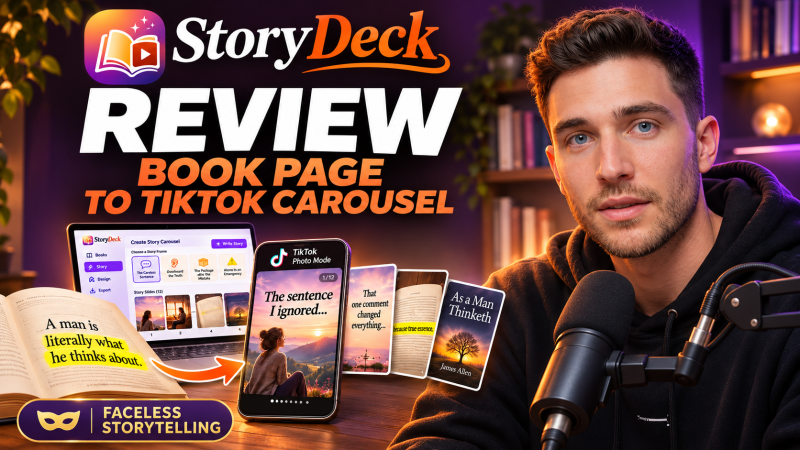
StoryDeck is a web app from Thu Thao that turns one page of a book into a faceless storytime carousel for TikTok Photo Mode, with a hook, a short first-person story, your real page with the line highlighted and your cover, starting at a one-time launch price of $17.
Product Brand: Thu Thao
Product Currency: USD
Product Price: 17
Product In-Stock: InStock
4

