
RoyaltyShelf AI Review
Bilingual Kids’ Books For Amazon KDP, And What To Expect Before You Upload
Why Bilingual Books Caught My Attention
Walk into any bookstore and count the picture books that carry two languages on every page. Not many, right? Now picture a parent who wants a Spanish-English bedtime story, a teacher who needs a French tracing workbook, or a grandmother hunting for a Portuguese coloring book for a visiting grandchild. They search, scroll, and settle for whatever turns up.
That gap is what RoyaltyShelf AI is built around. Clicks Botz launches it on November 12, 2026 as a cloud app that makes bilingual books and activity books, checks the language, and prepares the files for Amazon KDP, all for a $14 one-time launch price on Launchpad.
I like the idea. I’m also wary of it, because a pitch about publishing and royalties tends to get loud, and a loud pitch makes it hard to see the product underneath.
So in this RoyaltyShelf AI review I’ll walk through what the software does, how its three steps run, what the eight upgrades cost, how Amazon’s AI disclosure rule applies, and where the sales claims run ahead of anything a buyer can count on. You’ll find no earnings figures here, and that’s on purpose.
RoyaltyShelf AI Quick Facts

| Detail | Information |
|---|---|
| Product | RoyaltyShelf AI |
| Vendor | Clicks Botz (ClicksBotz) |
| Launch | November 12, 2026, 11:00 AM EST; the cart closes November 16, 11:59 PM EST |
| Sold through | Launchpad |
| Sales Page | https://royaltyshelfai.live/live/ |
| Category | AI book creation for Amazon KDP publishing |
| Type | Cloud web app, works in a browser on any device |
| Front-end price | $14 one-time launch price |
| Coupon | EARLYSHELF for an extra 10% off |
| Order form add-on | Royalty Quick-Start Kit, $9.98 |
| Upsells | Eight, each with a lower downsell, from $37 to $297 |
| Refund | 30 days |
A Publishing Studio For Two-Language Books
Think of a small studio with a writer, a translator, an illustrator, a proofreader and a formatter, all squeezed into one browser tab. That’s the pitch.
RoyaltyShelf AI is a done-for-you bilingual book creator for people who want to publish children’s books and activity books on Amazon. You choose a book type, a language, a dialect, an age group and a layout. The AI then writes the pages in both languages, draws the pictures, builds tracing pages and puzzles, runs a language check with an English back-translation, and exports files shaped for KDP.
The product covers six asset types: story books, activity workbooks, coloring books, puzzle books, culture and festival stories, and a tool that rewrites PLR content for a new market. Four language pairs sit alongside English: Spanish, French, German and Portuguese.
What it doesn’t do is just as important. It doesn’t create your Amazon account, it doesn’t upload for you, and it doesn’t make anyone buy. You still upload, you still price, and you still decide whether a book is good enough to put your name on.
What Sets It Apart From Generic AI Writers
Plenty of AI tools can spit out a story. Fewer bother with everything around a children’s book. Here’s where RoyaltyShelf AI picks a different road.
It writes in the target language. The vendor says text is created natively, with age-appropriate vocabulary, local names, foods and festivals, rather than translated from English afterward.
It checks its own work. A Language Quality Check looks at grammar, spelling, dialect consistency and reading level, then gives you a back-translation in English so you can read what each line says.
It keeps characters steady. A character you create is meant to look the same on every page, in watercolor, cartoon, crayon or line-art styles.
It builds activity pages. Tracing pages handle accented letters, and word searches, crosswords, matching games and mazes come with answer keys.
It thinks about Amazon. Interior files, a cover sized to your page count, an ebook, a printable PDF and a bilingual listing kit with seven keywords per marketplace.
It adds guardrails. A kid-safety filter, a uniqueness score, blocks on known characters, brands and real people, and a helper that tells you what to answer on KDP’s AI question.
None of that makes a book sell. It reduces the grunt work between an idea and an upload.
Meet Clicks Botz
Clicks Botz is the creator and JV manager behind RoyaltyShelf AI, and the sales page presents the company as ClicksBotz, an AI product team that builds simple tools for everyday people, pointing to an earlier launch called Faceless Empire AI as an example, though it names no individual and lists no wider track record, so there’s little outside history to weigh and I’d judge the product on the first week of use and the 30-day refund window rather than on a reputation.
What The $14 Gets You
Let me lay out the front end in plain terms, because the feature list on the page is long.
Core Features
- Six asset types. Story books, workbooks and activity books, coloring books, puzzle books, culture and festival stories, and the PLR Localizer.
- Language setup. Four language pairs, dialect control, four layouts including side-by-side and flip book, and age groups from 2 to 10.
- Native-Language Story Engine. Writes in the target language with a theme picker for ideas like kindness, bedtime and the first day of school.
- Consistent-Character Illustration Engine. Four art styles and characters that stay the same page to page.
- Activity Page Generator. Tracing, word search, crossword, matching and mazes, with answer keys.
- PLR Localizer with License Checker. You upload PLR you own along with its license, and the checker blocks conversion when the license doesn’t allow translation.
- Language Quality Check. Grammar, dialect and meaning, with a back-translation.
- Uniqueness and Compliance Check. Uniqueness score, kid-safety checks and the AI Disclosure Helper.
- One-Click KDP Export. Paperback interior with trim, bleed and margins, a cover with spine width, an ebook and a printable PDF.
- Bilingual Listing Kit. Title, subtitle, description, keywords, categories, age range, pen name, bio and A+ text.
- Publishing Planner and Rights and Records Vault. Tracks titles, schedules uploads inside KDP’s daily limit and stores licenses, original files and generation records.
- Free commercial license.
Launch Extras
The first 50 buyers get a Bilingual Niche Vault, a list of 50 book ideas with themes, age groups and keywords, during launch week only. The page also lists a KDP Royalty Quick-Start Guide and a Seasonal Royalty Calendar as launch-week bonuses.
What’s Not Included
Unlimited generation sits in an upgrade, so the front end has caps. More marketplaces, automation, done-for-you books, marketing assets, agency seats, reselling and white-label rights are each a separate purchase.
Three Steps From Idea To Upload Files
Here’s the workflow in the order the app runs it.
Step 1: Pick Your Royalty Asset, Language & Age Group
I start by choosing what to make: a story book, workbook, coloring book or puzzle book. Then I pick Spanish, French, German or Portuguese, the dialect, the age group and the layout. A few clicks, and the book is planned.
Step 2: Let The AI Create & Check Everything
Next I let the AI work. It writes every page natively in both languages, draws the pictures, and builds the tracing pages and puzzles. Then it checks grammar, dialect and meaning with a back-translation I can read in English, which leaves me with a finished and checked bilingual asset.
Step 3: Export, Upload & Earn Royalties
With one click I get the paperback interior, the cover with exact spine width, the ebook and a bilingual listing kit. I upload those files to KDP, and when a copy sells, Amazon prints it, ships it and pays the royalty. Then I repeat the process with the next book.
To explore the platform in more detail, don’t miss the demo video below:
Coupon: EARLYSHELF for an extra 10% off
Who Should Look At This
This isn’t for everyone, and that’s fine.
First-Time Publishers
If you’ve wanted to publish a children’s book but can’t write, draw or format, the tool gives you a draft and a set of files to inspect. Treat it as a starting point and not a finished product.
Teachers And Parents
If you can’t find the bilingual book your class needs, you could create one. You’ll want to read it carefully, and a native speaker should read it too.
KDP Publishers Looking For A New Shelf
If your English-language activity books are lost in a crowded category, a second language may open a different set of searches.
Agencies And Freelancers
Custom bilingual books for teachers, tutors and daycares are a service idea the vendor suggests. The agency upgrade adds seats and invoicing for that.
Who Should Skip It
If you expect royalties without any effort, or you can’t stand quality checking, skip it. If you won’t ask a native speaker to read your books, I’d skip it too. And if you aren’t willing to learn Amazon’s rules, the tool won’t protect you from them.
The Six Book Types In Plain Words
The names sound fancy, so here’s what each one actually is.
Story books. A short illustrated tale with text in two languages. The layout options decide whether the languages sit side by side or you flip the book to read the other half.
Workbooks. Activity pages built for practice, such as tracing letters or matching words to pictures. Parents and teachers tend to want these.
Coloring books. Clean line art with thick outlines, plus the bilingual words. They’re simple, which also makes them common on Amazon.
Puzzle books. Word searches, crosswords, matching games and mazes, each with answer keys so the puzzles always work.
Culture and festival stories. Books tied to occasions like Día de Muertos or Festa Junina. Seasonal books can be timed ahead of a holiday.
The PLR Localizer. This isn’t a book type so much as a rewriting tool. You bring PLR you own, the License Checker reads the license, and when translation is allowed the AI rewrites the material for a new market with a new title and structure.
If I were starting out, I’d begin with workbooks or coloring books. They’re forgiving, short and easy to proofread.
Language Checks And Why A Native Reader Still Matters
The back-translation feature is the part I find most interesting. It lets someone who doesn’t speak Spanish read an English version of what the Spanish says.
That’s useful. It isn’t the same as fluency.
A back-translation can show whether the meaning survived. It can’t always show whether a phrase sounds natural to a child in Mexico City versus one in Madrid, or whether a joke lands, or whether a word is oddly formal for a five-year-old. Dialect control helps, and the vendor’s own FAQ says doubtful lines get flagged and recommends a quick native review before you publish.
I’d take that advice seriously. Here’s a simple routine.
- Read the English back-translation first. Look for anything odd or off-topic.
- Check the flagged lines. Fix or remove them.
- Find a native reader. A teacher, a friend, or a paid proofreader for a modest fee.
- Order a printed proof. Look at the real thing, since text can crowd a page or an image can crop badly.
- Fix what you spot, then publish. Never upload in a rush.
Children’s books go to children. A mistake in a tracing page or a mislabeled picture is the kind of error that earns one-star comments.
Amazon’s AI Disclosure Rules For Publishers
Amazon KDP has a rule here, and it matters. When you publish a new book, or edit and republish one, KDP asks you to tell it about AI-generated content. That covers text, images and translations, and it includes cover and interior artwork.
KDP separates two ideas. AI-generated means a tool created the content, and it stays AI-generated even if you edit it heavily afterward. AI-assisted means you created the content and used AI to polish or check it, and that doesn’t need disclosure. A book written, illustrated and translated by RoyaltyShelf AI sits on the generated side.
The app includes an AI Disclosure Helper that tells you what to answer for each title and stores your answers. I like that, since it saves guesswork. But the rule belongs to Amazon, the wording changes, and the responsibility is yours. Read KDP’s current content guidelines before every batch, and answer the question honestly.
Disclosure isn’t permission, either. KDP still expects you to follow its content guidelines, including intellectual property rules, and it can remove books that mislead customers or disappoint them. Amazon’s policies are Amazon’s call, and nothing in a third-party tool can guarantee how they’ll be applied to your account.
Print-On-Demand Basics Without The Hype
The sales page makes Amazon’s part sound effortless, and in a way it is. KDP prints on demand, so there’s no inventory to buy and nothing to ship. When a customer orders, Amazon prints the copy, packs it, ships it and handles the customer.
Here’s what that doesn’t mean.
You don’t earn on every view. A royalty only arrives after a sale, and a sale only happens after someone finds your book, trusts the listing and clicks buy.
Printing eats into each royalty. Amazon subtracts printing costs, which depend on page count, trim size and ink, so a long color book earns less per copy than a short black-and-white one. Look at KDP’s own calculator for your specific book.
Listings need work. Titles, subtitles, descriptions, categories and keywords affect whether anyone sees your book. The Bilingual Listing Kit gives you a draft, and you’ll probably need to adjust it.
Reviews matter. A new book has none, and parents buying for a child often read them.
There’s a daily limit on new titles. The Publishing Planner schedules uploads inside that limit, which is a sensible touch.
None of this is meant to scare you. It’s meant to give you a realistic picture.
Seven Marketplaces: Read The Fine Print
The page says you can sell on up to seven Amazon marketplaces, listing the main US store plus the Mexican, Spanish, Brazilian, German, French and Canadian storefronts. That’s a nice-sounding line. Here are my questions.
- Do all seven take paperbacks? KDP’s availability differs by country and by format, and it changes. Check KDP’s current list of print marketplaces before you count on all seven.
- Does a Spanish book belong in every store? A book in Spanish and English might sell in Mexico or Spain, but a French pair probably makes more sense in France or Canada.
- What about currency and keywords? The listing kit has seven keywords per marketplace, but pricing in each store is your job.
- Are ebooks and paperbacks treated the same? They aren’t, so confirm each format.
There’s also a wrinkle in the funnel. The Global Expansion upgrade is described as adding international storefronts with localized currency and keyword sets, which makes me wonder how much of the seven-store pitch is in the front end. I’d ask support exactly what the $14 covers.
Other Ways To Use The Files
Amazon isn’t the only door. The page lists seven ways to put the output to work.
- Paperbacks on KDP. The main route.
- Ebooks. The same story as a Kindle edition.
- Several marketplaces. One idea in more than one store.
- Printable PDFs. Sold on Gumroad or Payhip to parents and teachers who print at home.
- Seasonal books. Holiday and festival titles made ahead of time.
- PLR rewrites. Content you already own, localized where the license allows.
- A custom book service. Bilingual books made on request for teachers, tutors, daycares and small schools.
The service route is the one I’d think about hardest. It sells your time and judgment, so it doesn’t depend on a book catching on in search. I’m leaving out the vendor’s example prices because they’re only illustrations. If you try it, quote what your own market will pay.
Quality, Uniqueness And Keeping Your Account Safe
Anyone can press a button and generate a book. Amazon’s customers can tell when a book is lazy.
Uniqueness. The app gives each book a uniqueness score and blocks known characters, brands and real people. That helps with trademark trouble. It doesn’t promise that two users won’t end up with similar books, so vary your themes and add your own touches.
Kid-safety. A filter checks text and images. It’s a safety net, not a replacement for you looking at every page.
PLR. Many PLR licenses forbid translation or resale in certain forms. The License Checker blocks conversion when translation isn’t allowed, which is a good guard, but read the license yourself too.
Rights records. The Rights and Records Vault stores licenses, original files and generation records per title, which could be handy if KDP ever asks where something came from.
Volume. Pumping out dozens of near-identical books is the fastest route to trouble on any platform. A slower, tidier shelf is safer.
Who Owns What You Publish
A free commercial license comes with the front end, and it’s easy to skim past. Don’t. The word commercial tells you that you may sell what you make. It doesn’t tell you the details, and the details are where people get stuck.
Before your first upload, read the license itself. Look for what it says about the text, the pictures and the files, whether it covers client work, and what you can and can’t do with the output if you resell it. If the wording is vague, email support and keep the reply.
Three other points deserve a minute.
- Your own inputs. If you bring PLR or any other material, the license on that material governs what you can do, whatever the app allows.
- Real names and characters. The tool blocks known characters, brands and real people, which is helpful, but you’re still the publisher of record.
- Pen names and records. KDP asks who the author is, and the Rights and Records Vault keeps a trail of what you used for each title.
Treat ownership as a checklist, not an assumption. Five minutes with the license now beats a takedown notice later.
Price, Coupon And Refund Terms
The front end is a one-time payment of $14 on Launchpad, labeled a launch price. The page says the usual price is higher and that it rises when the timer hits zero. It also states two different regular prices, one monthly figure in the price box and a lower monthly figure in the value stack, so I’d treat the crossed-out numbers as marketing and look only at today’s $14.
| Item | Price |
|---|---|
| Front end | $14 one-time |
| Royalty Quick-Start Kit | $9.98 one-time |
| All eight upgrades at listed prices | $886 combined |
Coupon
The page shows the code EARLYSHELF for an extra 10% off. At checkout, the total to pay moved from $14.00 to $12.44 with that code, while a made-up code changed nothing. A second code, SHELFVIP, appears in a pop-up if you try to leave the page, and it brought the total down to $10.67. Codes can expire, so confirm the total before you pay.
The Quick-Start Kit
The page offers a Royalty Quick-Start Kit for $9.98 beside the buy button, with a walkthrough, price-point cheat sheet, post templates, an extended license and bonus AI credits. Some of that wording, such as membership price points and retention posts, doesn’t sound like a book-publishing product, so ask support what the kit really contains before you add it.
Refunds
There’s a 30-day money-back guarantee. Contact the vendor’s support desk within 30 days and ask for your money back. That’s enough time to make a test book, run the language check, and look at the export files.
Coupon: EARLYSHELF for an extra 10% off
Eight Upgrades, Each With A Downsell
Eight upgrades follow the front end, and each one comes with a cheaper downsell. You must buy the front end first, because every upgrade builds on that account. I couldn’t open the upgrade pages without buying, so the descriptions and prices below come from the vendor’s funnel list, and I’d confirm them at checkout.
| OTO | Name | Price | Downsell |
|---|---|---|---|
| OTO 1 | RoyaltyShelf AI Unlimited | $47 (Elite $97) | $37 |
| OTO 2 | RoyaltyShelf AI Global Expansion | $67 | $62 |
| OTO 3 | RoyaltyShelf AI Autopilot | $67 | $57 |
| OTO 4 | RoyaltyShelf AI DFY | $97 | $67 |
| OTO 5 | RoyaltyShelf AI Booster | $67 | $62 |
| OTO 6 | RoyaltyShelf AI Agency | $97 | $87 |
| OTO 7 | RoyaltyShelf AI Reseller | $147 | $127 |
| OTO 8 | RoyaltyShelf AI Whitelabel | $297 | $247 |
OTO 1: Unlimited
It removes generation limits, so you get unlimited book creation and image rendering, longer page counts and higher-resolution exports, and an Elite version costs more. This is the one that matters if the front-end caps get in your way, so ask support what those caps are before you decide.
OTO 2: Global Expansion
It extends language support to more international Amazon storefronts, including Mexico, Spain, Brazil, Germany, France and Canada, with localized currency, keyword sets and wider language databases. Compare this with what the front end already lists.
OTO 3: Autopilot
It adds scheduling, topic research feeds and batch publishing workflows, meant to cut hands-on time. Automation is nice, but a book you haven’t read can’t be trusted, so I’d keep a human eye on every title.
OTO 4: DFY
You get pre-built bilingual books, ready-to-upload covers and keyword sets delivered to your account. The catch with shared done-for-you content is sameness, so check whether other buyers receive the same books.
OTO 5: Booster
It brings marketing assets, social promotion kits, A+ content banners and mockups meant to lift a book’s page conversion. Useful once you have books that sell, and early on it’s polish.
OTO 6: Agency
You get client management seats, invoicing and team access for selling bilingual book creation as a service. It only makes sense if you already have clients, or a plan to find them.
OTO 7: Reseller
It lets you resell the software and keep the profits across the funnel. Selling software is a separate business from publishing books, so I wouldn’t buy it casually.
OTO 8: Whitelabel
You can place your own logo, domain and colors on the dashboard. That’s for people who want to run it as their own product.
Which Ones Make Sense?
For most buyers, none on day one. Make a book or two first. If the caps annoy you, look at Unlimited. If you have clients, look at Agency. The rest are optional, and the downsells give you a second chance if you change your mind, which means there’s no hurry.
I didn’t find a bundle that combines the front end and the upgrades.
Coupon: EARLYSHELF for an extra 10% off
What Works And What Worries Me
What I Like
- A clear niche: bilingual children’s and activity books are a specific audience, and the product is built around them instead of around generic text.
- A language check with a back-translation: it gives non-speakers a way to read what the AI wrote.
- KDP-shaped output: interiors, covers with spine width, ebooks and listing kits are the awkward parts for newcomers.
- Compliance helpers: the disclosure helper, license checker and rights vault show someone thought about the rules.
- A low entry price: fourteen dollars is easy to test, and thirty days is a fair window.
- Honest FAQ answers: the page tells you to get a native review and to disclose AI content to KDP.
What Worries Me
- Quality depends on you: the checks flag problems, but they can’t replace a human reading the book.
- Crowded categories: coloring and puzzle books are everywhere on Amazon, so standing out takes thought.
- Limits on the front end: unlimited use costs more, and the cap isn’t spelled out.
- Eight upgrades: that’s a lot of upselling for a $14 product.
- A template feel in places: button text and add-on wording sound lifted from another product.
- No track record: the product is brand new, so there are no independent results yet.
Where The Royalty Dream Gets Ahead Of Reality
Every launch page sells a picture of the future. This one sells a shelf that fills up while you sleep. Here’s where I’d pump the brakes.
Royalty promises. The page leans on phrases like royalty machine and paid again and again, and it includes an illustration showing a shelf growing into a large monthly figure. I’m leaving the figures out. Royalties depend on price, page count, printing cost, marketplace, ranking, reviews and luck, and the page itself says they’re never guaranteed.
Other people’s results. The royalty reports and the bilingual publisher story on the page belong to other publishers, and the page says so. They aren’t RoyaltyShelf AI users. Their years of work, their niches and their timing don’t transfer to you.
The demand story. Market statistics about Spanish speakers and dual-language schools may well be true, and I can’t verify each one. Demand for bilingual books doesn’t mean demand for your particular book. A thin shelf in one search can still be full in the next.
World’s first. The claim is hard to check. Treat it as a slogan.
No second language needed. You can create a book in a language you don’t speak, but that doesn’t make it safe to publish unchecked. The vendor’s own FAQ recommends a native review.
Seven marketplaces. Availability varies by country and format, so confirm what each store accepts before you plan around it.
Amazon pays you. True, after a sale. Amazon sets the royalty terms, can change its rules, and can remove books that break its guidelines.
AI content. KDP asks you to disclose AI-generated text, images and translations. A book made entirely by this tool belongs in that group. Hiding it would put your account at risk.
Value stacks and was-prices. A giant stacked total and a crossed-out monthly price don’t tell you what the product is worth. Judge $14 by what you get.
Affiliate-side claims. One page aimed at affiliates calls the product a proven bestseller with a large user base. At launch the product is new, and the buyer page features beta testers, so I wouldn’t read that as a track record.
To be fair, the page includes real disclaimers, and the idea itself is sound. A bilingual shelf is thinner than an English one, and tools that handle the awkward parts of formatting and language checking are useful. Just keep expectations modest.
Questions For Support Before You Pay
Launch week is a good moment to ask, because replies tend to be fast. These are my questions.
- What are the front-end generation limits? How many books, pages and images?
- Which of the seven marketplaces does the front end cover? And in which formats?
- What’s in the Royalty Quick-Start Kit? Does it match a book-publishing product?
- How does the Language Quality Check decide a line is doubtful? And how often does it get it wrong?
- Do other buyers receive the same DFY books?
- Does the 30-day refund cover the upgrades? Including the downsells.
- What does the commercial license allow? Can I use the output for clients?
- Will pricing change after launch? And what happens to existing buyers?
Clear replies are a good sign. Vague ones tell you something too.
A Realistic First Month
If I bought RoyaltyShelf AI today, I’d keep my plan small and treat the month as a test.
Week one. Make one coloring book and one workbook in a single language pair. Read the back-translation, check the flagged lines and look at the exports.
Week two. Find a native reader for the best draft. Fix what they flag. Order a printed proof.
Week three. Read KDP’s current content guidelines, answer the AI question honestly, write the listing with the kit as a starting point, and upload one title.
Week four. Watch what happens. Note how long review takes, what the listing looks like, and whether anyone finds the book. Then decide about a second book, an upgrade or the refund.
By then I’d know whether the output is good enough, whether I enjoy the work, and whether the product earns its price. That’s worth more than any shelf of promises, and it all fits inside the refund window.
Final Thoughts On RoyaltyShelf AI
RoyaltyShelf AI is a useful-looking bilingual book builder wrapped in a very loud sales page. Strip away the royalty talk and you get six book types, four language pairs, a language check with back-translation, activity page tools, KDP-shaped files and a listing kit for $14.
I wouldn’t buy it expecting a shelf that pays you while you sleep. I’d buy it to find out whether the books it makes are good enough to publish, and I’d treat the first month as that test.
If you want to try it, buy the front end, make a couple of books, ask a native speaker to read them and compare the files with what KDP needs. Keep the upgrades for later. And if the output doesn’t meet your standard, use the 30 days and ask for your money back.
Frequently Asked Questions
What is RoyaltyShelf AI?
RoyaltyShelf AI is a cloud app that creates bilingual story books, workbooks, coloring books and puzzle books, checks the language, and exports files for Amazon KDP.
How much does RoyaltyShelf AI cost?
The front end is a $14 one-time launch price. A $9.98 add-on and eight upgrades follow, each with a lower downsell.
Is there a coupon?
Yes. The code EARLYSHELF took the checkout total from $14.00 to $12.44 when I tried it. Confirm the total before you pay.
Do I need to speak Spanish, French, German or Portuguese?
No, but you should still have a native speaker review each book. The vendor recommends that too.
Do I need a KDP account?
Yes. You need a free Amazon KDP account, and you upload the files yourself.
Do I have to disclose AI use to Amazon?
KDP asks you to disclose AI-generated text, images and translations. The app includes a helper, but the rule and the answers are yours to check.
Will I make royalties?
No tool can promise that. Royalties depend on your books, listings, pricing, reviews and the market.
Does it work on all seven Amazon marketplaces?
The page says up to seven. Availability varies by country and format, so check KDP before you plan around it.
What is the refund policy?
There’s a 30-day money-back guarantee. Contact the vendor’s support desk.
Do I have to buy the upgrades?
No. The front end works alone. You must buy it before any upgrade, though, and every upgrade is optional.
Get RoyaltyShelf AI With My Exclusive Bonuses
If RoyaltyShelf AI fits your plans, grab it through the link on this page, use coupon EARLYSHELF at checkout, and I will add my exclusive Tika Review bonus pack at no extra cost.
1. Buy RoyaltyShelf AI through the link on this page.
2. Find your bonuses in the member area, or email me your receipt.
3. Download your bonuses and put them to work.
Here is everything you get when you buy through my RoyaltyShelf AI review below:
1. Brainy Kids Mega Adventure Pack
2. Kiddz Stories
3. Kiddz Game Station
4. Kiddz Art Coloring
5. Healthy Foods Colouring Pages – Vegetables
6. StoryBoard Collection – Philosophy Edition
7. StoryBoard Collection – Mathematics Edition
8. StoryBoard Collection – Geography Edition
9. Healthy Foods Colouring Pages – Fruits
10. Childrens Video Channel
11. Educational Poster Prompts for Kids
12. Brainy Kids Mega Adventure Pack – Theme-Based Adventure
13. Inspirational Audiobooks for Kids
14. Brainy Kids Mega Adventure Pack – Seasonal and Holiday
15. Brainy Kids Mega Adventure Pack – Puzzle and Logic
16. Brainy Kids Mega Adventure Pack – Learning and Educational
17. Brainy Kids Mega Adventure Pack – Creative and Imaginative
18. Genius Kids Learning Kit
Coupon: EARLYSHELF for an extra 10% off
Clicks Botz
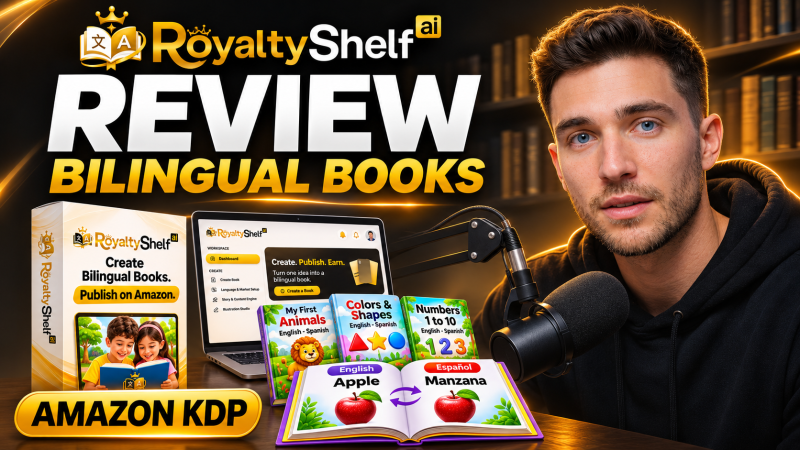
RoyaltyShelf AI is a cloud app from Clicks Botz that creates bilingual story books, workbooks, coloring books and puzzle books in Spanish, French, German or Portuguese paired with English, checks the language with a back-translation, and exports KDP-ready interiors, covers, ebooks and printable PDFs for a one-time launch price of $14.
Product Brand: Clicks Bot
Product Currency: USD
Product Price: 14
Product In-Stock: InStock
4.4

