
ProsperaBuilder Review 2026
Build And Automate An AI-Powered Business
Running an online business usually means handling dozens of disconnected tasks. You may need to research offers, plan content, write emails, create social posts, design landing pages, generate images, organize client information, and repeat the same work every week.
AI can reduce that workload, but using AI effectively often creates another problem: too many tools, prompts, subscriptions, and manual handoffs.
ProsperaBuilder approaches the problem differently. Instead of presenting AI as a single chatbot, it organizes AI capabilities into ready-made businesses, specialist employees, reusable workflows, knowledge bases, brand voices, and automated schedules.
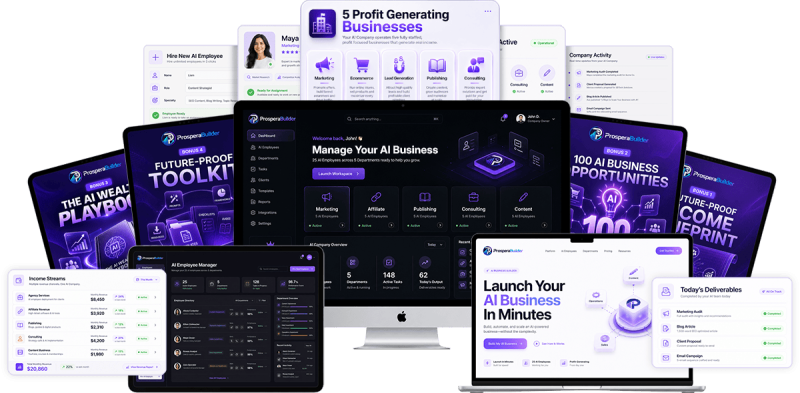
The platform includes five preconfigured AI businesses and 25 specialist AI employees. It also provides a visual workflow builder that can connect tasks such as brainstorming, content generation, advertising, page creation, image generation, competitor research, and delivery.
This ProsperaBuilder review examines how the platform works, what its main features can realistically do, who may benefit from it, the current pricing structure, and the limitations buyers should understand before purchasing.
Overview Of ProsperaBuilder

| Product | ProsperaBuilder |
| Creator | Jono Armstrong and team |
| Product Type | AI business and workflow automation platform |
| Launch Date | August 6, 2026 |
| Front-End Price | $37 during the launch period |
| Access | Cloud-based |
| Included Businesses | Five |
| Included AI Employees | 25 |
| Custom AI Employees | Available through the AI Employee Builder |
| Refund Policy | 30-day money-back guarantee |
| Official Website | https://www.prosperabuilder.com/future-proof |
ProsperaBuilder is presented as a cloud-based platform for building and operating AI-assisted online businesses. Its dashboard brings together prebuilt business models, specialist AI agents, workflow templates, a visual automation builder, brand voice controls, knowledge bases, saved outputs, and scheduling.
The five included businesses are designed around marketing, content, lead generation, ecommerce, and consulting activities. Each business contains its own overview and workflows that users can open, modify, and run.
The broader product information also groups the included employees into marketing, affiliate, publishing, consulting, and content departments. Buyers should therefore focus on the actual workflows and agents available inside their accounts rather than relying only on department labels used in promotional descriptions.
What Is This App?
ProsperaBuilder is an AI workflow platform designed to turn separate marketing and business tasks into connected processes.
A normal AI interaction usually looks like this:
- Open a chatbot.
- Write a prompt.
- Copy the result.
- Open another application.
- Reformat or repurpose the content.
- Repeat the process for the next asset.
ProsperaBuilder allows users to build a sequence instead. One workflow could brainstorm campaign ideas, turn those ideas into advertisements, create related social posts, combine the outputs, save everything to the dashboard, and send the final material by email.
The platform supports both prebuilt templates and custom workflows. Users can configure individual steps, select an available AI model, apply a brand voice, connect a knowledge base, and decide where the finished output should go.
That makes ProsperaBuilder more than a collection of prompt templates. Its main value lies in the way it connects AI tasks and lets users reuse or schedule those processes.
It does not create a profitable business automatically. Users still need to choose a sensible market, review generated material, find customers or an audience, and apply an appropriate offer strategy. What the software can do is reduce the repetitive production and organization involved in those activities.
Who’s Behind The Creation?
ProsperaBuilder was created by Jono Armstrong and his team.
Jono Armstrong is known in the digital marketing market for releasing software and training products related to automation, traffic generation, content production, and online business growth. Previous products associated with him include Byte, WebinarClones AI, Traffic Magnets, TrafficOS AI, and ReviewSuite360.
That background is relevant because ProsperaBuilder is designed around practical marketing workflows rather than general-purpose AI conversations. The platform includes tools for campaigns, offers, content, lead funnels, reports, pages, and client-related deliverables.
A creator’s previous launches do not guarantee the long-term performance of a new platform. Buyers should still evaluate ProsperaBuilder according to its current features, support, development, and suitability for their own business.
The Features Of ProsperaBuilder
Five Ready-Made AI Businesses
ProsperaBuilder includes five preconfigured AI businesses accessible from the main dashboard and the AI Businesses area.
The businesses shown inside the platform cover:
- AI marketing
- AI content
- AI lead generation
- AI ecommerce
- AI consulting
Each business includes an explanation of its purpose and workflows related to that activity.
This structure can help beginners who understand the result they want but are unsure which AI tasks should be connected. Instead of beginning with an empty chatbot, they can open a relevant business and examine the available processes.
The businesses should be treated as organized operating frameworks, not autonomous companies that independently attract customers or collect revenue. Users remain responsible for directing the work and applying the outputs.
25 Specialist AI Employees
The ProsperaBuilder front-end offer includes 25 named AI employees organized into five teams.
The listed departments cover marketing, affiliate promotion, publishing, consulting, and content. Their responsibilities include activities such as:
- Marketing audits
- Email creation
- Social media content
- Reports
- Product reviews
- Bonus material
- Bridge-page content
- Offer research
- Book marketing
- Amazon optimization
- Market research
- Proposals
- Business strategy
- Blog posts
- Newsletters
- Video scripts
- Advertising copy
Organizing agents by role can make the platform easier to understand. A user who needs an SEO content plan, for example, can choose a relevant agent rather than designing a detailed prompt from the beginning.
The agents are also editable. Users can change their instructions, AI model, brand voice, and connected knowledge base. This flexibility is important because a fixed agent may not fit every niche or client.
AI Employee Builder
ProsperaBuilder allows users to create custom AI employees for roles that are not already covered.
The setup is positioned as a three-click process in which the user gives the employee a name and defines its job. The practical value is the ability to save a specialized configuration instead of repeatedly entering the same instructions.
Possible uses could include creating an employee for:
- Podcast planning
- Local business outreach
- Product-description writing
- Course lesson development
- Customer research
- Webinar promotion
The usefulness of a custom employee will still depend on the quality and specificity of its instructions. Giving an agent a job title alone does not guarantee consistently accurate work.
Drag-And-Drop Workflow Builder
The visual workflow builder is one of ProsperaBuilder’s most substantial features.
Users begin by selecting New Workflow and adding nodes to a visual canvas. Supported actions shown within the workflow system include:
- Brainstorming ideas
- Generating content
- Rewriting text
- Summarizing material
- Producing hooks
- Writing emails
- Creating social posts
- Generating advertisements
- Analyzing an offer
- Conducting competitor research
- Creating pages
- Generating images
- Collecting text, URL, file, or prompt inputs
- Saving and distributing results
Each node can be configured independently. In a brainstorming step, for instance, the user can choose the number of ideas, set an angle, select an AI model, apply a brand voice, and connect a knowledge base.
The output of that step can then feed into another node. Ideas could become advertisements, and the same ideas could also be turned into social posts.
This node-based approach gives users more control than a single long prompt. It also makes successful processes reusable.
Conditional Workflow Logic
ProsperaBuilder supports conditional paths inside workflows.
A user could create a rule that checks an output and sends it down a different path when a condition is met. One demonstrated example involved checking whether the word count was below a specified number.
Conditional logic can be useful when a workflow needs different actions depending on the result. A short article could be sent to an expansion step, while a sufficiently long article could move directly to editing or delivery.
This capability adds flexibility, but it may also introduce a learning curve. Beginners may prefer to start with templates before building complex branching workflows.
Multiple AI Model Options
ProsperaBuilder workflow steps and AI agents can use the system default or an available model from providers such as OpenAI, Anthropic, Google, or Groq.
Model selection can be helpful because different models may respond differently to writing, summarization, research, or structured instructions.
The product information states that users do not need separate ChatGPT or Claude subscriptions for the included access. However, buyers should check the current plan terms for any usage allowances, limits, or fair-use conditions, particularly if they intend to run high-volume automated workflows.
Brand Voices
The ProsperaBuilder Brand Voices section lets users create reusable writing profiles.
A brand voice can include:
- A voice name
- Tone
- Intended audience
- A sample of the desired writing style
Once created, the voice can be applied to workflow steps and agents. This can help keep emails, advertisements, articles, and social content closer to a consistent style.
Brand voice settings are especially useful for agencies or marketers managing several businesses. Each brand can have its own tone and audience rather than receiving the same generic AI wording.
Generated content should still be reviewed. A writing sample can guide the model, but it does not guarantee perfect tone matching in every output.
Knowledge Bases
ProsperaBuilder lets users create knowledge libraries containing information about a business, brand, offer, or client.
Supported knowledge inputs shown in the platform include:
- Website URLs
- Sitemaps
- Plain text
- Uploaded files
- Markdown files
- CSV files
- JSON files
- Documents
The platform can fetch and index information from a website URL. The resulting knowledge base can then be connected to an agent or workflow so that generated material has more business-specific context.
This can be valuable for recurring work. Rather than explaining the same company, product, target audience, and positioning in every prompt, users can maintain that information in a reusable library.
The quality of the output will depend heavily on the quality and freshness of the source material. Old pricing, inaccurate claims, or inconsistent documents can lead to unreliable content.
Ready-Made Workflow Templates
ProsperaBuilder includes preconfigured workflow templates.
One available example repurposes a blog post into social content. A template can be cloned, opened, edited, and saved as a separate workflow.
Users can remove existing nodes, add new actions, combine outputs, and adjust the template to fit their preferred process.
Templates reduce the difficulty of starting from a blank canvas. They can also help beginners understand how different nodes connect before they create their own workflows.
AI Flow Builder
The ProsperaBuilder AI Flow Builder can generate a workflow from a plain-language instruction.
For example, a user can request a workflow that creates a lead magnet funnel with emails. The platform then builds an initial sequence containing relevant input, content-generation, email, and delivery nodes.
The generated workflow can be saved immediately or opened in the visual builder for further editing.
This feature may be one of the easiest entry points for beginners. Instead of determining every node manually, users can describe the desired outcome and refine the proposed structure.
The generated flow should still be checked before running it. Users need to confirm that inputs, delivery actions, calls to action, and brand settings match the intended campaign.
Page Generation And HTML Export
The ProsperaBuilder workflow builder includes a page-generation node.
Available page types include:
- Sales pages
- Lead pages
- Thank-you pages
- Coming-soon pages
- General pages
- About pages
Users can enter details such as the business name, target audience, primary benefit, call-to-action text, and destination link.
The generated result can contain formatted HTML. Once saved, users can copy the text or download the HTML file for use on a suitable hosting platform.
This can speed up the first-draft stage of creating a simple campaign page. It should not be confused with a full visual website builder offering advanced responsive editing, analytics, checkout functionality, or native hosting unless those functions are separately confirmed.
Before publishing, users should check the page design, mobile display, links, compliance language, and factual accuracy.
Saved Outputs And Delivery Options
ProsperaBuilder workflow results can be saved inside the platform.
The workflow builder also supports several output destinations, including:
- Dashboard
- Report
- Text export
- Webhook
- Combined output
Webhook delivery creates opportunities to connect a workflow with third-party automation services. Zapier was mentioned as an example, while another platform name in the source material was unclear and should not be treated as a confirmed integration.
Saving outputs centrally makes it easier to return to previous results, copy material, or download generated HTML.
Workflow Scheduling
ProsperaBuilder lets users create schedules for completed workflows.
A workflow can be selected, named, assigned a time and frequency, and configured to send results by email.
A marketer could schedule a content process to generate a blog draft, images, advertisements, or emails at a set time. This reduces the need to open the platform and run the same sequence manually each day.
Scheduling can improve consistency, but automatic generation should not mean automatic publishing without review. Content involving facts, pricing, legal statements, medical topics, client promises, or brand-sensitive language requires human checking.
Cloud-Based Access
ProsperaBuilder runs in the cloud and is described as accessible from computers, tablets, and mobile devices.
Cloud access removes the need to install desktop software and makes it possible to check workflows from different devices.
The visual workflow builder will likely be more comfortable on a larger screen, particularly when creating complex flows with several connected nodes.
And here’s the icing on the cake – with ProsperaBuilder, you’ll also get these limited-time bonuses:
How Does ProsperaBuilder Work?
The clearest way to understand ProsperaBuilder is to follow the workflow shown inside the platform.
Step 1: Choose An AI Business Or Start A Workflow
After entering the dashboard, users can open one of the five AI businesses or go directly to the workflow area:
Each business contains an overview and related workflows. This helps users choose a starting point based on the activity they want to complete:
Users who already know the exact process they need can select New Workflow:
Step 2: Add The Required Workflow Nodes
The next step is to drag the desired actions into the builder:
A simple promotional workflow could include:
- Brainstorm ideas.
- Generate advertisements.
- Create social posts.
- Combine the results.
- Save the output.
A more advanced workflow could add offer analysis, competitor research, image generation, page creation, conditional rules, email delivery, and webhook actions.
Step 3: Configure Each Action
Every node needs appropriate settings.
For a brainstorming node, the user can choose the number of ideas, define the angle, select an AI model, connect a brand voice, and choose a knowledge base:
An advertising node can specify a platform such as Facebook or Instagram and request several variations:
A social-post node can select a platform, set the number of posts, and decide whether hashtags should be included:
This configuration stage matters because precise settings usually produce more relevant outputs than generic instructions.
Step 4: Connect The Nodes
The nodes are joined so that one result becomes the input for the next action.
Brainstormed ideas can feed into an advertising generator and a social-post generator. Both results can then connect to a combined output node.
Conditional nodes can divide the workflow when different results require different treatment.
Step 5: Choose Where The Result Goes
Users can save output to the dashboard, create a report, send the result by email, export text, or send data through a webhook.
Several outputs can also be combined into one final result.
Choosing the destination in advance can reduce manual copying once the workflow finishes.
Step 6: Save And Run The Workflow
After saving the workflow, the user selects Run and provides the requested input:
The demonstrated example used a short description of an offer. The workflow then created ideas, advertisements, and social posts from that input:
Once complete, the output could be saved and viewed from the Saved Outputs area:
Step 7: Review And Refine The Output
Generated results should be checked before use:
Users should review:
- Factual accuracy
- Relevance
- Brand tone
- Claims
- Formatting
- Links
- Calls to action
- Repetition
- Platform compliance
The workflow can then be edited if a step needs a different prompt, model, brand voice, knowledge base, or output action.
Step 8: Schedule Reusable Workflows
When a workflow is working as intended, it can be placed on a schedule:
The user selects the workflow, timing, recurrence, and email-delivery preference. ProsperaBuilder then runs it at the scheduled time.
This turns a one-time process into a repeatable content or marketing routine.
For a thorough exploration of the platform, be sure to check out the demo video below:
Who Should Try ProsperaBuilder?
ProsperaBuilder is most suitable for people who regularly perform multiple AI-assisted marketing or content tasks.
Affiliate Marketers
Affiliate marketers can use workflows to research offers, plan review content, produce promotional emails, create social posts, and prepare bridge-page copy.
The ability to connect these tasks may save more time than generating each asset separately.
Affiliate users must still verify product claims, pricing, bonuses, and refund details before publishing.
Content Creators And Bloggers
Bloggers can use ProsperaBuilder for topic planning, article drafting, repurposing, social content, email creation, and recurring content schedules.
Brand voices and knowledge bases may help keep material aligned with an existing website.
The platform is better suited to accelerating an editorial process than replacing editing and fact-checking.
Freelancers
Freelancers who provide content, email, research, page, or campaign services may benefit from repeatable workflows.
A freelancer could create a knowledge base and brand voice for each client, then clone a standard workflow for recurring deliverables.
Commercial client rights are associated with the separate AI Agency Kit upgrade, so anyone planning to sell outputs or services should confirm the exact licence included with the plan they purchase.
Marketing Agencies
Agencies may use the system to standardize production across clients.
Knowledge bases, brand voices, reusable workflows, scheduling, and webhook delivery can reduce repetitive setup.
Agencies requiring unlimited teams, projects, memory, knowledge bases, client portals, contracts, and broader commercial rights will need to examine the relevant upgrades rather than assuming everything is included in the front-end plan.
Coaches And Consultants
Consultants can create research summaries, proposals, reports, strategy materials, lead magnets, emails, and presentation drafts.
A business-specific knowledge base can make recurring outputs more relevant, provided that the information remains accurate and updated.
Ecommerce Sellers
Ecommerce operators could use workflows for product messaging, promotional emails, advertisements, social posts, offer analysis, and simple campaign pages.
ProsperaBuilder is not documented as a complete ecommerce storefront, inventory system, payment processor, or order-management platform. It supports marketing production around an ecommerce business rather than replacing the underlying commerce infrastructure.
Beginners Exploring AI Automation
The included businesses, agents, templates, and AI Flow Builder lower the barrier to creating workflows.
However, complete beginners should expect to learn several concepts, including nodes, inputs, outputs, model selection, knowledge bases, webhooks, and conditional paths.
The software avoids coding, but “no coding” is not the same as “nothing to learn.”
Why Is It Worth Checking Out?
ProsperaBuilder deserves attention because it addresses one of the biggest weaknesses of ordinary AI tools: disconnected work.
A chatbot can write an email. Another tool can generate an image. A page builder can create a landing page. An automation service can transfer data. The difficulty comes from coordinating those activities repeatedly.
ProsperaBuilder places many of those steps inside a single visual process.
The strongest value comes from five areas.
- Reusable workflows: Once users have built a process that matches their business, they can save it instead of rebuilding prompts every time.
- Business context: Brand voices and knowledge bases are more practical than expecting users to paste the same background information into every request.
- Beginner-friendly starting points: The included templates and AI Flow Builder let users learn by modifying a working sequence rather than beginning with an empty canvas.
- Scheduling: Repetitive workflows can run automatically for daily idea generation, weekly content drafts, recurring emails, or internal reports.
- Flexible delivery: Outputs can be delivered through email, dashboard storage, text export, HTML download, and webhooks.
These capabilities could replace parts of several separate AI and automation subscriptions for suitable users. The actual savings depend on which features a buyer already has and whether the front-end limits are sufficient.
The main consideration is that ProsperaBuilder provides infrastructure, not customers or guaranteed income. A well-designed workflow can produce assets faster, but business results still depend on market demand, offer quality, distribution, selling skills, and human judgment.
Pros & Cons
Pros
- Includes five ready-made AI business structures
- Provides 25 specialist AI employees
- Supports custom AI-agent creation
- Visual drag-and-drop workflow builder
- Includes reusable workflow templates
- AI Flow Builder can create an initial workflow from plain-language instructions
- Supports brand voices and business knowledge bases
- Offers several AI model choices
- Can create connected sequences for content, emails, advertisements, images, research, and pages
- Supports conditional workflow paths
- Generates downloadable HTML for supported page workflows
- Saves outputs inside the dashboard
- Offers email, text, report, dashboard, and webhook delivery options
- Allows recurring workflow schedules
- Cloud-based access from computers, tablets, and phones
- Front-end launch price is relatively accessible
- Includes a 30-day money-back guarantee
Cons
- The promotional language can make the “AI business” concept sound more autonomous than it is
- Users still need a viable offer, audience, client-acquisition method, and quality-control process
- Advanced workflow construction may require practice
- AI-generated material needs human review before publication or client delivery
- Several important scaling and commercial features are sold through upgrades
- The complete funnel costs substantially more than the $37 front-end price
- Front-end usage limits are not clearly detailed in the available information
- Long-term reliability, support quality, and update frequency cannot yet be assessed for a newly launched platform
- Page generation does not appear to replace a complete website or funnel platform
- Commercial rights should be confirmed before using front-end outputs for paid client services
ProsperaBuilder Pricing
The front-end version of ProsperaBuilder is listed at $37 during the launch period.
The $37 figure is launch pricing and may change. Buyers should verify the current checkout amount and licence terms on the official website.
The OTO Details
ProsperaBuilder has five optional upgrades. The front-end product must be purchased before adding funnel upgrades.
OTO 1: ProsperaBuilder Unlimited AI – $97 Per Year >>More Details<<
Unlimited AI is designed for users who need greater capacity.
It includes:
- Unlimited AI employees
- Unlimited teams
- Unlimited projects
- Unlimited memory
- Unlimited knowledge bases
This upgrade may suit agencies, active marketers, or users managing several brands.
The mention of “unlimited” features in this upgrade also suggests that the front-end version may contain limits. Those exact front-end allowances should be checked before purchasing.
OTO 2: ProsperaBuilder AI Business Pack – $67 >>More Details<<
The AI Business Pack unlocks 50 additional preconfigured AI businesses.
Examples include:
- AI Marketing Agency
- AI Copywriting Agency
- AI Accounting Firm
- AI Legal Office
- AI Recruiting Agency
- AI Property Management
- AI Ecommerce Company
- AI Course Business
- AI Coaching Business
- AI Book Publishing Business
The pack is intended for users who want templates covering more industries and service models.
Industry-specific AI businesses do not replace qualified professionals. Outputs involving law, accounting, employment, property, health, or financial decisions require appropriate expert review.
OTO 3: ProsperaBuilder AI Agency Kit – $97 >>More Details<<
The AI Agency Kit is intended for users selling AI-assisted services to clients.
It includes:
- Commercial agency licence
- Client dashboard and portals
- Contracts and proposals
- Agency sales scripts
- Client onboarding system
- Done-for-you service packages and pricing
This upgrade is particularly important for freelancers and agencies because it contains the explicitly documented commercial agency licence.
Before serving clients, buyers should read the complete licence and determine what can be sold, transferred, branded, or delivered.
OTO 4: ProsperaBuilder Voice Studio – $97 >>More Details<<
Voice Studio converts written output into AI-generated voiceovers.
It includes voice options for the 25 included AI employees and is positioned for content such as:
- Podcast episodes
- YouTube narration
- Video sales letters
- Emails
- Reports
- Documents
- Advertisements
- Course lessons
The upgrade is listed as a one-time payment with lifetime and unlimited voice generation.
Voice quality was not sufficiently demonstrated in the available product information, so buyers interested in this upgrade should listen to current samples before purchasing.
OTO 5: ProsperaBuilder White Label – $497 >>More Details<<
The White Label upgrade allows users to rebrand the platform and sell access under their own identity.
It includes:
- White-label rights
- Custom branding
- Custom domain
- Custom login
- Subscription billing
- User-defined plans
- Revenue retention
This upgrade is aimed at experienced marketers who want to operate a branded software business.
White-label ownership should not be confused with owning the underlying source code or technology unless the licence specifically says so. Buyers should carefully review hosting responsibilities, user limits, support obligations, updates, payment processing, and long-term platform dependency.
NOTE:
Here are some OTO links for your reference. You have to buy FE firstly and then you can buy any OTOs if you like.
If you buy OTOs alone, you will receive NOTHING and it takes your time to ask for refund. Remember FE is a must-have package to at least make sure the software is working
ProsperaBuilder Bundle
The ProsperaBuilder Bundle is listed at $317 per year.
The bundle includes:
- Unlimited AI
- AI Business Pack
- AI Agency Kit
- Voice Studio
- Launch bonuses
The listed coupon code is PROSPERA50, which is presented as reducing the bundle price by $50 during the applicable promotion.
The product information contains inconsistent normal-price references for the Agency Kit and Business Pack in the bundle calculation. Buyers should rely on the live checkout page rather than the promotional savings calculation.
The White Label upgrade does not appear to be included in the $317-per-year bundle.
Is ProsperaBuilder Legit?
ProsperaBuilder appears to be a legitimate newly launched AI workflow product with a functioning dashboard and a demonstrated operating process.
The platform shows more substance than a simple collection of generic prompts. Its visual workflow builder, configurable nodes, multiple model choices, agents, templates, brand voices, knowledge bases, saved outputs, page generation, webhooks, and schedules form a coherent automation system.
Its legitimacy should not be interpreted as a guarantee that every buyer will build a successful AI business. The software can help produce and organize work, but it cannot guarantee customers, traffic, sales, or income.
Because ProsperaBuilder launched on August 6, 2026, there is not yet enough long-term evidence to judge reliability, development consistency, customer support, or performance under heavy use.
The 30-day refund policy gives buyers a limited period to test the platform. Anyone purchasing should use that period to check the workflows, output quality, limits, licensing, support responsiveness, and compatibility with their intended business.
Frequently Asked Questions
Do I Need Experience To Use ProsperaBuilder?
Coding experience is not required. The included businesses, templates, agents, and AI Flow Builder make the platform accessible to beginners.
Users will still need to learn how nodes, inputs, outputs, brand voices, knowledge bases, and schedules work.
Does ProsperaBuilder Require A Monthly AI Subscription?
The official offer states that separate ChatGPT and Claude subscriptions are not required for the included AI access.
ProsperaBuilder Unlimited AI is an optional annual upgrade. Buyers should verify the front-end usage limits and fair-use terms before deciding whether the standard plan is sufficient.
Can I Create Custom AI Employees?
Yes. ProsperaBuilder includes an AI Employee Builder for creating custom agents. Users can define the role and customize elements such as instructions, model, brand voice, and knowledge base.
Can I Use ProsperaBuilder On A Mobile Device?
The software is cloud-based and is described as accessible through phones, tablets, and computers.
Building complicated visual workflows may be easier on a desktop or laptop.
Can ProsperaBuilder Create Landing Pages?
The workflow builder includes page-generation nodes for sales, lead, thank-you, coming-soon, general, and about pages.
Supported outputs can be saved as HTML and downloaded. Users will need an appropriate place to upload or publish the file.
Does It Integrate With Zapier?
The workflow system supports webhook output, and Zapier was mentioned as a possible destination.
The exact setup, supported actions, authentication requirements, and plan restrictions should be checked inside the current product.
Can It Publish Content Automatically?
The platform can schedule workflows and deliver generated results by email or other configured output methods.
Direct native publishing to every major content platform was not demonstrated. A webhook may support external automation, but users should verify each intended publishing connection.
Does ProsperaBuilder Include Commercial Rights?
The AI Agency Kit includes an explicitly stated commercial agency licence for serving clients.
Commercial rights attached to the $37 front-end offer are not sufficiently detailed. Buyers planning to sell services should confirm the licence before using outputs commercially.
What Is The Refund Policy?
ProsperaBuilder is sold with a 30-day money-back guarantee.
Buyers should review the current refund terms, request method, and eligibility conditions on the official checkout or support pages.
Is ProsperaBuilder A Business-In-A-Box?
It is better described as an AI business-production and workflow system.
It includes structures, agents, templates, and automation tools, but users must still select a market, create an offer, review deliverables, attract customers, and manage the business.
Final Verdict
ProsperaBuilder offers a practical way to move beyond isolated chatbot prompts and create reusable AI-assisted business workflows.
Its strongest features are the visual workflow builder, configurable AI agents, templates, brand voices, knowledge bases, multiple output options, and scheduling. Together, these tools can reduce repeated manual work for marketers, affiliates, content creators, consultants, freelancers, and small agencies.
The platform is most attractive to people who already know what they want to produce but need a better system for connecting research, content, promotional assets, pages, and delivery.
Beginners can also use it, although they should start with existing businesses and templates before attempting complicated conditional workflows.
ProsperaBuilder is less suitable for anyone expecting AI employees to find customers, run a company independently, or create guaranteed income. Human strategy, editing, compliance, selling, and quality control remain essential.
The $37 front-end price makes the core platform relatively affordable to explore. However, buyers should evaluate the full funnel carefully. Unlimited capacity, additional business templates, agency rights, voice generation, and white-label functionality require separate purchases.
Overall, ProsperaBuilder is a promising AI workflow platform for users who want to build repeatable marketing and content systems without coding. Its value will depend less on the “own an AI company” positioning and more on whether the workflow builder helps the buyer complete real, useful work faster.
A sensible approach is to begin with the front-end version, test it against one genuine workflow, confirm the limits and licence, and consider an upgrade only when a specific business requirement justifies the additional cost.
Affiliate disclosure: This article may contain affiliate links. TikaReview may receive a commission if you purchase through one of these links, at no additional cost to you. This does not affect the editorial assessment.
ProsperaBuilder is an AI business and workflow automation platform created by Jono Armstrong and his team. It includes five ready-made AI businesses, 25 specialist AI employees, custom agents, workflow templates, brand voices, knowledge bases, page generation, saved outputs, webhooks, and automated schedules.
Product Brand:
Jono Armstrong
Product Currency:
USD
Product Price:
37
Product In-Stock:
InStock ProsperaBuilder
4.2
(You will receive ALL Bonuses on Part 1 to Part 5)
PART 1
PART 2
PART 3
PART 4
PART 5
And you can pick 1 package (for each purchase) from the following packages that you think are the most useful for you:
***3 STEPS TO CLAIM THIS BONUSES***
Step 1: Order ProsperaBuilder Review through my ProsperaBuilder Review:
Step 2: After you complete the order, send [the receipt id] in a message to my email at: support@tikareview.com or complete your information on this page.
Step 3: I will send all bonuses for you within 24 hours. Please wait your bonus.

