
Done On Command Review 2026
Can One AI Run Your Business Marketing?
Running an online business rarely means doing one job.
A typical campaign may require a landing page, images, a promotional video, an email sequence, lead capture, social media posts, hosting, and some form of customer support. Even when AI speeds up individual tasks, business owners still have to move information between different platforms, maintain brand consistency, review the output, and publish everything manually.

Done On Command attempts to solve that workflow problem.
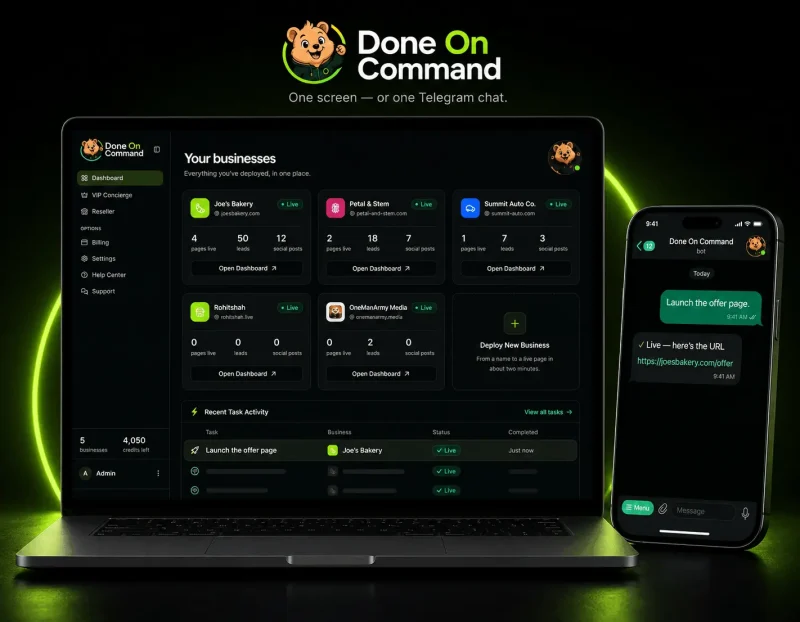
Instead of presenting itself as another AI writer, image generator, or page builder, it is designed as a persistent-memory AI business operator. You create a business inside the platform, give it a website or basic business description, and it builds a reusable memory containing the brand’s identity, offers, tone, and key information.
That memory then supports pages, videos, images, lead magnets, emails, social content, and website chatbot responses.
The concept is ambitious. The important question is whether the connected workflow offers enough practical value to justify adding another AI platform to your business.
In this Done On Command review, I will explain what the software does, how the demonstrated workflow operates, what is included in the $47 plan, which upgrades are available, its strongest advantages, its limitations, and who should consider buying it.
Done On Command Quick Verdict
Best for: Freelancers, small agencies, local marketers, coaches, ecommerce businesses, and affiliate marketers who regularly produce several types of marketing assets.
Not ideal for: Businesses requiring advanced custom development, unrestricted production, detailed creative control, or established enterprise-level automation.
Main strength: A persistent business memory connects several marketing departments and helps maintain brand consistency.
Main limitation: The front-end plan includes relatively modest monthly limits, especially for users managing active client campaigns.
Overall recommendation: Done On Command is worth considering when your biggest difficulty is coordinating several separate marketing tools. It is less compelling when you already have a reliable technology stack or need highly customized production workflows.
Done On Command Overview
| Product | Done On Command |
| Creators | Todd Gross and Rohit Shah |
| Category | AI business operator and marketing automation platform |
| Access | Cloud-based, browser access |
| Command Methods | Dashboard and Telegram |
| Front-End Price | $47 one-time during launch |
| Businesses Included | Up to 2 |
| Monthly Credits | 1,000 |
| Video Output | Up to 720p on the front end |
| Hosting | 1 year |
| Storage | Up to 1 GB |
| Commercial License | Included |
| Refund Period | 14 calendar days |
| API Key Required | No |
| Launch Date | August 4, 2026 |
Pricing and availability can change after the promotional period, so buyers should verify the current checkout page before purchasing.
What Is Done On Command?
Done On Command is a hosted AI platform that turns plain-language instructions into business and marketing deliverables.
The platform covers seven operational areas:
- Pages
- Video
- Images
- Lead magnets and lead capture
- Social media
- Website chatbot support
These departments share one business memory.
When a business website is added, Done On Command is designed to identify elements such as its logo, colors, fonts, tone of voice, offers, and important business details. Those details can then be applied to later projects.
This is a meaningful distinction from isolated AI tools. A normal chatbot may produce a landing page today and forget the brand context tomorrow. Done On Command aims to preserve that information so future assets start from the same business identity.
Users can issue tasks through the web dashboard or Telegram. Completed work moves into an approval queue, where it remains until the user chooses to publish, send, or schedule it.
Who Created Done On Command?
Done On Command is associated with Todd Gross and Rohit Shah.
Todd Gross serves as the launch partner and product presenter. He has a long background in broadcasting and digital product presentations.
Rohit Shah is identified as the co-founder and technical lead responsible for building the platform’s business-memory engine, connected departments, and approval workflow.
Creator history can provide context, but it should not replace product evaluation. The more relevant consideration is whether the platform’s workflow, limits, integrations, and output fit the buyer’s needs.
What Problem Does Done On Command Solve?
AI has made individual marketing tasks faster, but it has also created a fragmented software stack.
A small business might use:
- One AI tool for copy
- Another for images
- A video generator
- A landing-page builder
- An email provider
- A social scheduler
- A chatbot service
- Cloud storage
- A project-management system
Each platform has its own interface, billing arrangement, limits, and brand settings.
The user becomes the integration layer.
Done On Command tries to reduce that fragmentation by putting the production process behind one command interface. The platform remembers the business, creates the requested asset, stores it, and sends it to the appropriate publishing or approval stage.
For solo operators, this may reduce repetitive setup work. For agencies, it may also make client separation easier because every business can have its own memory and dashboard.
It does not remove the need for strategy, quality control, legal review, or campaign planning. Its value lies primarily in coordinating production.
What Makes Done On Command Different?
Persistent Business Memory
The primary differentiator is the reusable business memory.
After reading a website, the system is designed to retain:
- Logo
- Brand colors
- Fonts
- Tone of voice
- Offers
- Business details
- Relevant knowledge
That information becomes the default context for future output.
In practical terms, a bakery’s promotional page, social posts, email campaign, chatbot answers, and video should all reflect the same business identity without requiring separate brand prompts.
This can save time, but it also makes the accuracy of the original memory important. Users should review the imported information carefully before relying on it across multiple channels.
Connected Marketing Departments
The platform is not limited to creating one asset type. Pages, videos, images, lead capture, email, social content, and chatbot responses all operate from the same business profile.
That connection matters more than a long feature list. A page can collect a lead, the lead can enter an email workflow, and related social posts can be scheduled around the same offer.
Human Approval Gate
Done On Command does not automatically publish every generated result.
The official workflow shows tasks pausing for approval before sending or scheduling. This helps reduce the risk of an AI system publishing incorrect promotions, unsuitable copy, or unfinished creative work.
The user still needs to review facts, links, dates, claims, and branding. The approval gate creates an opportunity for that review; it does not perform the review on the user’s behalf.
Multiple-Business Management
Each business has its own memory and dashboard.
This is particularly relevant to agencies and freelancers. Client assets can remain separated, and the client can receive access to a branded environment without seeing unrelated businesses or account-wide usage information.
The front-end supports two businesses. Higher tiers increase the allowance.
Telegram Control
Users can send commands and approve work through Telegram.
This may be useful for quick instructions away from a desktop, although complex page editing, campaign review, and detailed quality control will generally be easier on a larger screen.
Main Done On Command Features
1. Business Memory
The memory system creates a reusable brand and business profile from a website or business description.
Instead of explaining the same company in every prompt, the user establishes the context once. That profile then supports future tasks.
Why it matters: Repeated prompting is one of the biggest inefficiencies in general-purpose AI tools. Persistent context can make recurring production faster and more consistent.
Best for: Agencies, content teams, ecommerce brands, local businesses, and anyone producing multiple asset types for the same offer.
Consideration: Incorrect source information may be repeated across several outputs, so the initial business profile should be checked carefully.
2. Website and Page Creation
Done On Command can create landing pages and multi-page websites with navigation.
The demonstration shows a promotional preorder page being generated, revised through a text command, approved, and published to a hosted URL. A custom domain can also be connected according to the official presentation.
The platform also advertises screenshot-based page recreation.
Why it matters: Users can move from instruction to hosted page without exporting copy into a separate page builder.
Best for: Campaign pages, lead-generation pages, event promotions, simple business websites, and client offer pages.
Consideration: Advanced design control, responsive customization, code access, accessibility tools, page-speed controls, and complex ecommerce functionality are not fully documented.
3. White-Label Business Dashboards
Each business can receive a separate dashboard.
The client-facing area is designed to use the agency’s branding and a neutral portal rather than displaying Done On Command branding.
Why it matters: Agencies can present the system as part of their own service delivery.
Best for: Freelancers, marketing consultants, local agencies, and done-for-you service providers.
Consideration: The front-end includes commercial rights, but higher-capacity agency features and removal of page watermarks are associated with the Agency Platinum upgrade.
4. Dashboard and Telegram Commands
Users can describe a task in ordinary language from the main command center or Telegram.
The platform shows task status while the work is being processed.
Why it matters: A unified command interface may feel simpler than learning a separate workflow for every asset type.
Best for: Nontechnical users and operators managing recurring marketing tasks.
Consideration: Plain-language control can be convenient, but precise creative tasks may still require several revision commands.
5. AI Video and Image Production
The video tools are presented as capable of generating promotional videos with scenes, voiceovers, captions, and brand styling.
A spokesperson workflow can animate a single photograph. Users can also provide existing footage for editing.
Images are generated using the same business context.
Why it matters: Video production usually involves scripts, narration, visuals, captions, and editing. Combining these stages can shorten the production process.
Best for: Local business promotions, product videos, short social content, simple ads, and agency deliverables.
Consideration: The front-end allows five generated and five edited videos per month at up to 720p. Users producing video regularly may need the Pro upgrade.
6. Lead Magnets and Lead Capture
The platform can create quizzes and lead magnets with lead capture.
Leads may come from quizzes, forms, pages, or spreadsheet imports. The demonstration also indicates that lead data can be exported or synchronized with an email system.
Why it matters: A page is more useful when it includes a path for turning visitors into contacts.
Best for: Coaches, consultants, local businesses, course creators, and affiliate marketers.
Consideration: Consent management, privacy compliance, form customization, double opt-in, and advanced segmentation are not clearly documented.
7. Email Campaigns
Done On Command drafts campaigns using the business memory and sends them through the user’s existing autoresponder after approval.
Confirmed services include:
- GetResponse
- GoHighLevel
- Brevo
- Mailchimp
Why it matters: The business keeps its list inside its existing email account instead of transferring ownership to another platform.
Best for: Businesses that already use a supported autoresponder but want help creating campaigns.
Consideration: Deliverability still depends on the connected provider, domain reputation, consent practices, list quality, and campaign content.
8. Social Media Planning and Scheduling
The social module can prepare a calendar of branded posts and schedule them across connected networks.
The demonstration names Instagram, TikTok, YouTube, LinkedIn, Facebook, X, and Pinterest.
Buffer and Upload-Post are also listed as integrations.
Why it matters: Creating a month of connected content around one campaign is more efficient than generating posts separately.
Best for: Local businesses, ecommerce brands, coaches, and agencies managing recurring social calendars.
Consideration: Posting support can vary by platform, account type, media format, and external API restrictions.
9. Website Chatbot
A chatbot can be embedded on a website using a code snippet.
It answers questions using information stored in the business memory or knowledge base.
Why it matters: A small business can provide basic answers outside normal operating hours.
Best for: Frequently asked questions, product information, business hours, service details, and basic lead support.
Consideration: A chatbot should not be trusted blindly for medical, legal, financial, safety-critical, or policy-sensitive answers. Its knowledge base must be maintained and tested.
10. Central Asset Library
Pages, images, videos, lead magnets, and user-uploaded files are stored by business.
The front-end includes up to 1 GB of persistent storage.
Why it matters: Reusing existing creative assets becomes easier when they remain attached to the correct business profile.
Best for: Agencies and businesses running repeated campaigns.
Consideration: One gigabyte may be restrictive when storing video assets or working across several clients.
How Does Done On Command Work?
The demonstrated process follows a logical sequence.
Step 1: Create a Business
The user creates a separate business inside the command center.
This keeps its brand information, assets, tasks, and client access separate from other businesses.
Step 2: Add a Website or Business Description
An existing website can be entered so the platform can identify branding and business information.
A website is not required. A user can instead provide a name and business idea, although a newly generated brand should receive careful human review.
Step 3: Review the Business Memory
The platform builds a stored profile containing colors, logo, fonts, voice, offers, and business facts.
This step matters because the information may influence every later deliverable.
Step 4: Enter a Command
The user requests a deliverable, such as:
- Create a promotional page
- Generate a spokesperson video
- Build a quiz
- Draft an email campaign
- Schedule a month of social posts
- Configure a chatbot
The command can be entered through the dashboard or Telegram.
Step 5: Let Tasks Process
Some tasks can run while the user works on other departments.
In the official example, a spokesperson video renders in the background while the page and campaign assets are created.
Step 6: Review and Revise
The user inspects the result and can request changes using plain-language commands.
For example, a page headline can be enlarged or a button can be given more urgency without opening a conventional visual editor.
Step 7: Approve the Output
Tasks stop at the approval gate.
The user approves the page, email, social schedule, or other asset before it goes live.
Step 8: Publish, Send, or Schedule
Pages can be hosted, emails can be sent through the connected autoresponder, and social posts can be scheduled through connected networks.
Step 9: Reuse Assets
Completed and uploaded files remain in the business library for later campaigns.
For a closer look at all the features, be sure to watch the demo video below:
What Was Demonstrated?
The official walkthrough uses a fictional or demonstration bakery client.
The workflow includes:
- Creating the bakery as a business
- Importing its website
- Building the business memory
- Requesting a spokesperson video from one image
- Generating a Mother’s Day preorder page
- Revising the page through chat
- Publishing it to a hosted URL
- Creating a lead-generation quiz
- Capturing and managing leads
- Drafting and approving an email announcement
- Preparing a month of social posts
- Scheduling content across connected networks
- Creating a website chatbot
- Answering a product-related visitor question
- Storing assets in the media library
- Providing separate client access
- Using Telegram as an alternative command interface
This is more useful evidence than a static feature list because it shows how the departments connect.
However, a controlled demonstration cannot establish long-term reliability, average output quality, or how the system behaves across every industry.
Who Is Done On Command For?
Agency Owners
Agencies can assign a separate business memory and dashboard to each client.
This may support monthly services covering pages, social campaigns, email, video, and lead generation.
The front-end’s two-business limit is enough for testing or a very small operation. A growing agency will likely need a capacity upgrade.
Freelancers
A copywriter, video creator, designer, or marketing assistant could use the platform to add adjacent services without building every deliverable manually.
A freelancer should still develop expertise in the services being sold. Automation does not remove responsibility for quality.
Local Marketers
Local businesses often need straightforward campaigns rather than advanced enterprise systems.
A marketer could use Done On Command to create promotion pages, lead magnets, short videos, email announcements, and scheduled social content around events or seasonal offers.
Coaches and Course Creators
Coaches may find the combination of landing pages, quizzes, lead capture, email, and social promotion useful when launching a webinar, consultation offer, course, or downloadable resource.
Ecommerce Businesses
The system may help smaller stores maintain promotional content across email, social media, pages, images, and video.
It is not presented as a replacement for a complete ecommerce platform.
Affiliate Marketers
Affiliate marketers can use the commercial content-production tools to create pages, visuals, videos, and promotional campaigns.
They remain responsible for affiliate disclosures, advertising rules, platform policies, and factual product claims.
Small Business Owners
A business owner without a dedicated marketing team may value the simplified interface and connected brand memory.
The system will still require time for reviewing output, maintaining business information, and managing campaign strategy.
Who Should Avoid Done On Command?
Done On Command may not be the right choice for:
- Developers needing complete source-code control
- Designers requiring pixel-level manual editing
- Enterprises with strict procurement, security, and compliance requirements
- Large agencies needing extensive capacity on the entry plan
- Users expecting unlimited video and image generation for $47
- Businesses relying on unsupported software
- Anyone unwilling to review AI-generated output
- Buyers expecting guaranteed traffic, sales, leads, or income
- Users who already have a mature, integrated marketing stack
The platform is designed to simplify production, not replace strategic judgment or specialist tools in every category.
Practical Use Cases
Seasonal Local Promotion
A bakery, salon, clinic, restaurant, or gym could create:
- A campaign page
- A short promotional video
- Social graphics
- A lead magnet
- An announcement email
- Scheduled posts
- A question-answering chatbot
All assets could use the same seasonal offer and brand identity.
Client Campaign Package
A freelancer could provide a monthly package containing:
- One campaign page
- Several images
- One promotional video
- Weekly social posts
- One email campaign
- Lead capture
- Basic chatbot maintenance
The commercial license allows users to sell generated work, although service quality remains the freelancer’s responsibility.
Course or Coaching Launch
A creator could build a quiz, registration page, promotional video, email sequence, and social calendar for a new program.
Affiliate Campaign
An affiliate marketer could prepare a branded review page, supporting images, short videos, email content, and scheduled social posts.
Claims must still be checked against the actual product being promoted.
Done On Command Pros and Cons
Pros
- Persistent brand context: The business memory reduces the need to re-enter logos, colors, offers, and tone in every task.
- Connected workflow: Pages, video, images, leads, email, social media, and chatbot support operate inside one environment.
- Human approval layer: Content waits for approval before it is sent, scheduled, or published.
- Commercial license included: The front-end plan permits users to sell generated deliverables and services.
- No mandatory API key: The platform includes monthly credits, so a separate AI subscription is not required to begin.
- Browser-based access: There is no software installation or server setup.
- Telegram commands: Users can issue instructions and approve work from a mobile chat interface.
- Existing email list remains with the user: Email campaigns are sent through supported third-party autoresponders.
- Separate business profiles: Every business receives its own memory and assets.
- One-time launch pricing: The $47 offer may be attractive to users who prefer avoiding another recurring subscription.
Cons
- Modest front-end limits: Five generated videos, 10 images, and 10 pages per month may not support heavy production.
- 720p front-end video: Users needing higher-resolution output will require an upgrade.
- Pages include a watermark on the entry plan: Removal is associated with the Agency Platinum upgrade.
- Storage may be limited: One gigabyte can fill quickly when storing videos and large media files.
- Several valuable capabilities require upgrades: Higher resolution, increased generation limits, more businesses, agency assets, and reseller rights are not all included in the base purchase.
- Long-term performance is not yet established: A launch demonstration does not prove uptime, support quality, or output consistency over time.
- AI output requires review: Brand memory and approval controls reduce risk, but they cannot guarantee factual accuracy or appropriate messaging.
- Integration coverage is incomplete: Only a specific group of autoresponders and social connections is confirmed.
Done On Command Pricing
Front End: Done On Command Commercial — $47 One-Time
The Done On Command front-end plan is listed at $47 one-time during the launch period.
For a solo operator testing the workflow, this is a reasonably complete starting point.
The limits become more important when the software is used for multiple client campaigns.
Done On Command OTOs
OTO 1: Done On Command Pro — $67 One-Time
Pro includes:
- Up to five businesses
- Up to 4K video output
- Twice the video, image, and page generation limits
- One additional year of hosting
- Priority support
This is the most practical upgrade for users who need higher-resolution video or slightly greater production capacity.
OTO 2: VIP Concierge — $67 One-Time
VIP Concierge includes:
- Three done-for-you business setups
- Up to 4K video
- Twice the video, image, and page limits
- An additional year of hosting
- Priority support
This package appears designed for users who want help configuring their first business profiles.
There is significant overlap between the listed Pro and Concierge benefits, so buyers should compare the current checkout descriptions carefully.
OTO 3: Agency Platinum — $97 One-Time
Agency Platinum includes:
- Up to 10 businesses
- 5,000 monthly credits
- Removal of the Done On Command watermark from generated pages
- Agency website
- Agency assets
- Agency license
This is the most relevant upgrade for users intending to manage several clients under their own brand.
OTO 4: Reseller Pro — $197 One-Time
Reseller Pro includes:
- 25 accounts
- Front-end access
- Pro
- VIP Concierge
- Agency Platinum
The reseller offer is designed for buyers who want to sell access to the software rather than only sell the work produced with it.
Users should verify reseller conditions, account allocation, support obligations, branding rules, and license terms before buying.
Done On Command Everything Bundle
The Done On Command bundle is presented as including the front end and all four upgrades:
The listed component value is $347, with a stated $60 coupon reduction using the code DOCBundle, bringing the advertised price to $287.
The bundle may make sense for:
- Agencies planning to manage several businesses
- Buyers needing 4K video
- Users wanting concierge setup
- Buyers interested in reseller rights
- Users who prefer purchasing the full funnel at once
It is unnecessary for someone who only wants to test the core system on one or two businesses.
Always verify the live bundle price and inclusions before checkout.
Which Plan Offers the Best Value?
Choose the Front End When:
- You manage one or two businesses
- You want to test the complete workflow
- 720p video is acceptable
- Your monthly content volume is modest
- You mainly need commercial creation rights
Consider Pro When:
- You need 4K video
- You want higher generation limits
- You manage up to five businesses
- Priority support matters
Consider Agency Platinum When:
- You manage several client accounts
- You need more monthly credits
- You want watermark-free pages
- You plan to sell an agency service
Consider the Bundle When:
- You already know you need most upgrades
- You want reseller access
- You need the highest capacity currently described
- The bundle costs less than your intended individual upgrades
Do not buy the complete funnel solely because it exists. Start with the business requirements and choose the smallest package that meets them.
Done On Command Refund Policy
The refund period for Done On Command is 14 calendar days from the original purchase time recorded by JVZoo.
This is shorter than the 30-day guarantee often seen with digital launch products.
Buyers should use the refund period actively:
- Create a real business profile
- Check the imported brand memory
- Generate at least one page
- Test an image or video
- Connect a supported integration
- Review the approval workflow
- Check storage and credit usage
- Contact support with a practical question
This is more useful than judging the platform from the sales page alone.
Does Done On Command Require API Keys?
No external AI key is required to start.
The Done On Command front end includes 1,000 monthly credits.
The official FAQ also states that users may optionally connect an OpenRouter key. When connected, eligible AI actions are described as costing zero platform credits.
Before using an external key, users should review:
- OpenRouter pricing
- Model availability
- Data policies
- Key security
- Which Done On Command actions use the external key
- Whether image and video operations are included
Optional API support can reduce dependence on platform credits, but it adds another account and potential usage cost.
Is Done On Command Legit?
Done On Command presents a coherent product rather than an unrelated bundle of AI generators.
The official demonstration shows the core workflow connecting a business profile with page creation, video, lead capture, email, social scheduling, chatbot support, asset storage, client access, and Telegram commands.
Its pricing, usage limits, upgrades, commercial rights, and 14-day refund terms are also disclosed.
These factors make it reasonable to describe Done On Command as a legitimate launch offer based on the available official information.
That conclusion should not be misunderstood as a guarantee of performance.
Its long-term reliability, support quality, output consistency, and ability to replace a mature marketing stack remain areas that buyers should test for themselves.
Important Limitations and Buying Considerations
A Business Memory Is Only as Accurate as Its Source
If the website contains outdated prices, offers, services, or policies, the AI may carry those details into future assets.
Review the memory before launching campaigns.
Approval Is Not the Same as Quality Assurance
The platform pauses for approval, but the user must still detect:
- Incorrect claims
- Broken links
- Unsuitable visuals
- Outdated promotions
- Compliance issues
- Brand inconsistencies
- Awkward AI language
- Incorrect chatbot answers
High-Volume Users May Outgrow the Front End
The base plan is suitable for testing and moderate use.
An agency delivering several videos, pages, and social campaigns every month may require Pro, Agency Platinum, or the bundle.
Hosting Has a Stated Time Limit
The front end includes one year of hosting. Pro and VIP Concierge list an additional year.
The future renewal cost and migration process are not clearly established in the available information.
It Does Not Guarantee Customers or Revenue
The platform can reduce production friction.
It cannot guarantee that a campaign will attract traffic, convert leads, close clients, or generate income. Those results depend on the offer, market, positioning, traffic, follow-up, and service quality.
Done On Command Alternatives
No single alternative exactly reproduces the full connected workflow, but several approaches may suit different users.
GoHighLevel
GoHighLevel may be a better fit for established agencies requiring CRM, automation, funnels, pipelines, reputation management, and broader client operations.
It usually involves a recurring subscription and a more involved setup.
Systeme.io
Systeme.io may suit creators who mainly need funnels, email marketing, courses, automation, and checkout functionality.
It does not focus on persistent brand memory or connected AI media production in the same way.
Canva Plus ChatGPT Plus an Email Platform
This modular stack gives users more direct creative control.
It may be preferable for businesses already comfortable coordinating several tools, but it requires more manual transfer between platforms.
HubSpot
HubSpot is more appropriate for companies needing mature CRM, reporting, sales pipelines, marketing operations, and enterprise integrations.
It is a substantially different product category and can be much more expensive.
Specialized AI Tools
A dedicated page builder, video editor, image generator, and social scheduler may each provide deeper controls than an all-in-one platform.
This approach is better for specialists who prioritize quality and customization over workflow consolidation.
Frequently Asked Questions
What is Done On Command?
Done On Command is a hosted AI business operations platform that creates pages, videos, images, lead magnets, email campaigns, social content, and website chatbot responses using a persistent business memory.
How much does Done On Command cost?
The front-end launch offer is listed at $47 as a one-time payment. Optional upgrades cost $67, $67, $97, and $197. Pricing may change after the launch period.
Is Done On Command a monthly subscription?
The launch offer is presented as a one-time purchase. Official information states that the product is expected to move to monthly pricing after the launch period, while launch buyers retain the deal they purchased.
How many businesses can I manage?
The front end supports up to two businesses. Pro increases this to five, and Agency Platinum increases it to 10.
Does it require an API key?
No. Monthly platform credits are included. An OpenRouter key can be connected optionally.
Can I use Done On Command for client work?
Yes. A commercial license is included with the front end. The Agency Platinum upgrade adds higher capacity, agency assets, watermark removal, and an agency license.
Does it publish content automatically?
The system can host pages, send emails, and schedule social posts, but the demonstrated workflow includes an approval gate before these actions proceed.
Which email platforms does it support?
The confirmed integrations are GetResponse, GoHighLevel, Brevo, and Mailchimp.
Can it create full websites?
The platform is presented as capable of generating landing pages and multi-page websites with navigation. Advanced development and customization options are not fully documented.
Can it create spokesperson videos?
Yes. The demonstrated workflow creates a promotional spokesperson video from a single photograph, including voiceover, captions, and supporting footage.
Are commercial rights included?
Yes. The front-end plan includes a commercial license that allows users to sell generated pages, videos, campaigns, and related services.
Does the front end include white-label features?
Each business is presented as receiving a client-facing dashboard. However, the entry plan places a Done On Command watermark on generated pages. Watermark removal is listed under Agency Platinum.
What is the refund policy?
Buyers can request a refund within 14 calendar days from the original purchase.
Is Done On Command beginner-friendly?
The plain-language command workflow appears approachable for beginners. However, users still need basic marketing judgment and must review every generated asset before approval.
Can Done On Command guarantee business results?
No. It can assist with production and coordination, but traffic, leads, sales, client acquisition, and income depend on factors outside the software.
Final Verdict
Done On Command addresses a real weakness in the current AI software market.
Many AI platforms generate isolated drafts. They do not remember the business reliably, coordinate assets across channels, manage client separation, or carry the work through an approval and publishing process.
Done On Command attempts to connect those stages.
Its persistent business memory is the most compelling part of the offer. When it works accurately, it can reduce repeated setup and help pages, videos, emails, social posts, and chatbot responses feel like parts of the same campaign.
The approval gate is another practical decision. It gives users control before AI-generated work affects a live business or client account.
The main concern is capacity. The $47 front-end plan includes the full core workflow, but its video, image, page, storage, resolution, and business limits are better suited to testing, solo use, or light client production than a busy agency.
Done On Command is therefore easiest to recommend to freelancers, small agencies, local marketers, coaches, ecommerce sellers, and affiliate marketers who currently lose time switching between disconnected tools.
It is less suitable for businesses that need advanced design control, enterprise integrations, unrestricted output, or proven long-term operational reliability.
Viewed as a workflow accelerator rather than an autonomous replacement for a marketing team, Done On Command offers an interesting and potentially valuable approach. The $47 front end provides enough functionality to test the central idea, while heavier users should calculate their real capacity needs before adding upgrades.
Overall assessment: A promising all-in-one AI business operator with a strong connected workflow, practical brand memory, and meaningful commercial-use potential. Recommended for suitable users with the understanding that human review, business strategy, and realistic expectations remain essential.
Affiliate Disclosure
This article may contain affiliate links. If you purchase through one of these links, TikaReview may receive a commission at no additional cost to you. This does not affect the price you pay or the editorial conclusions in this review.
Done On Command is a hosted AI business operations platform that creates pages, videos, images, lead magnets, email campaigns, social content, and website chatbot responses using a persistent business memory.
Product Brand:
Todd Gross and Rohit Shah
Product Currency:
USD
Product Price:
47
Product In-Stock:
InStock Done On Command
4.4
(You will receive ALL Bonuses on Part 1 to Part 5)
PART 1
PART 2
PART 3
PART 4
PART 5
And you can pick 1 package (for each purchase) from the following packages that you think are the most useful for you:
***3 STEPS TO CLAIM THIS BONUSES***
Step 1: Order Done On Command Review through my Done On Command Review:
Step 2: After you complete the order, send [the receipt id] in a message to my email at: support@tikareview.com or complete your information on this page.
Step 3: I will send all bonuses for you within 24 hours. Please wait your bonus.

