
Odin AI Review
The Desktop AI Agent That Actually Gets Work Done on Your Mac or Windows Machine
You know that feeling when your to-do list keeps growing even though you’ve been glued to your screen all day? Research tabs pile up, forms need filling, data needs organizing, emails need sending, and somehow the important creative work keeps getting pushed back. Most AI tools promise to help, but they usually just hand you text or instructions. Then you still have to do the clicking, the copying, the actual execution.
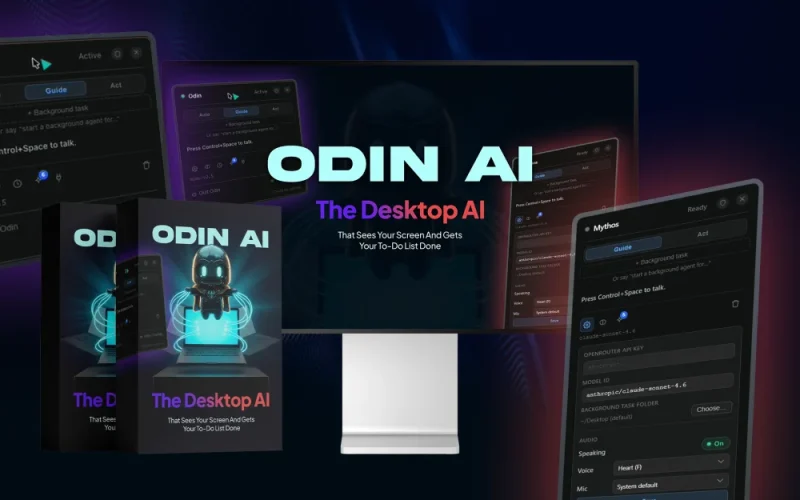
Odin AI is different. It’s a desktop app for Mac and Windows that lives on your computer, sees what’s on your screen the moment you summon it, and then goes to work. It can guide you step by step, take full control and complete tasks hands-free, or run entire jobs in the background while you walk away. One hotkey, one spoken or typed command, and it handles the busywork using your real browser sessions and files.
I’ve spent time digging into how this thing actually operates, what the creator built it for, and whether the promises hold up in real workflows. If you’re a freelancer, content creator, marketer, consultant, or anyone who spends hours on repetitive digital tasks, this review breaks down everything you need to know before deciding if Odin AI deserves a spot on your machine.
Overview Of Odin AI

| Creator | Neil Napier & Ijlal Ahmed |
| Product | Odin AI |
| The official page | https://get.heyodinai.com |
| Front-end price | $37 (one-time payment) |
| Coupon | No |
| OmniMint AI Suite Bundle | YES, |
| The Bundle’s page | https://get.heyodinai.com/bundle |
| The Bundle’s price | $297 – $497 (one-time payment) |
| Discount code for the Bundle | No |
| Bonus | Yes, Huge Bonus |
| Guarantee | 14-day money-back guarantee! |
| Support | Support Desk: support@kyvio.com |
What Is Odin AI?
Odin AI is a desktop AI agent that doesn’t just chat or generate text. It takes the keyboard and mouse on your actual computer. You press a single hotkey (Control + Space by default), speak or type what you need, and it sees your screen instantly. No long context prompts. No starting from scratch every time.
The real magic sits in three working modes. Guide Mode overlays visual instructions so you learn or follow along. Act Mode takes over completely and finishes the job while you watch or step away. Background Agent Mode — the real standout — lets you hand off a task, lock your screen if you want, and come back later to a finished deliverable.
Everything runs locally on your machine. The screen reading, browser automation, and actions all happen in your already-logged-in Chrome sessions. No remote browser you have to log into, no passwords handed over to a third-party cloud, no always-on hosted instance sitting exposed. The AI brain itself connects through OpenRouter, so you pick the model (free or premium) and control the tiny daily cost — often just pennies for heavy use.
The software itself is a one-time purchase. There’s no monthly platform fee. You get a ready library of Conquests — pre-built, named tasks across content, outreach, research, client service, hiring, and more. Just pick one, give context, and let it run.
In short, Odin AI turns your computer into a capable assistant that actually finishes work instead of just advising you on how to do it.
What Makes Odin AI Different?
Most AI agents today run entirely in someone else’s cloud. You log into a remote browser, give it access, and hope nothing sensitive leaks. The actions happen invisibly on their servers. You get billed monthly, often heavily.
Odin AI flips that model completely. It installs on your Mac or Windows machine and stays there. When it works, you see every click, every tab it opens, every form it fills — right on your own screen in real time. It uses the browser sessions you already have open. No re-logging. No copy-pasting credentials.
That local-first approach changes the trust equation. Your files stay on your drive. Your logins never get typed or stored by the tool. The only thing that leaves your computer is the AI request itself, routed through whichever model you chose on OpenRouter.
It also removes the “always-on” risk. Cloud agents often need persistent accounts. Odin AI only runs when you tell it to. You can stop it instantly with one key. It pauses automatically the second you touch the mouse or keyboard. It never touches passwords or card details and asks for confirmation before anything irreversible.
Add the Telegram integration and you can fire off tasks from your phone while sitting on the couch or driving (safely, of course). The desktop does the heavy lifting and reports back when done.
Most tools give you output. Odin AI gives you a finished result on your machine.
Who Brought To You?
|
|
|
Neil Napier created Odin AI. He’s not a theorist dropping his first AI product. He’s spent years building and selling practical automation and content tools that real agencies and creators actually use. People know him for cutting through complexity in video workflows and AI systems. Previous products include OmniMint AI Suite, Vibe Traffic, and PodGorilla.
That background matters. He understands the exact pain points agencies face when scaling client work — the endless research, formatting, outreach, and production tasks that eat margins. His approach has always been “simplify what actually works and ship it fast.”
He partnered with technical architect Ijlal Ahmed to make the local screen-seeing desktop agent stable and ship-ready. The result feels like it was built by people who’ve lived the daily grind rather than people guessing what the grind looks like.
The Features Of Odin AI
Let’s break this down section by section so you see exactly what you’re getting.
Lives On Your Computer – Mac + Windows
You install a native desktop app. No browser extension. No web app you forget about. One hotkey brings it up anywhere — inside any program or website. It sees your full screen the moment it opens, so context is automatic. You talk to it naturally and get voice responses back. No steep learning curve or prompt engineering required.
Runs On Your Machine – You Watch It Work
This is the core differentiator. The app, screen vision, and browser automation all execute locally. Every action appears visibly on your screen. It drives your real Chrome with your existing logins. No remote browser. No handing over passwords. No always-on cloud account exposed 24/7. It only runs when you run it.
Deploys An Agent Army – Three Ways To Work
+ Guide Mode shows you exactly what to click with visual overlays. Perfect when you’re learning a new tool or want to understand the steps.
+ Act Mode takes full control. It clicks, types, fills forms, and completes tasks while you watch or do something else.
+ Background Agent Mode is the centrepiece. You give it a task, it launches, and you can walk away. Multiple specialized agents can work simultaneously on screen. You come back to finished work.
Telegram Remote Control
Send a command from your phone. The desktop executes it. You get notified when it’s done. Send and receive files and voice notes through Telegram on higher tiers. This turns your phone into a true remote control for your computer’s workload.
Odin’s Conquests – Done-For-You Tasks Ready From Day One
A growing library of named, ready-to-activate tasks. Categories include:
+ Content Conquests: Social post batches published directly, newsletters, blog outlines, full no-face videos, content calendars.
+ Outreach Conquests: Personalized cold email campaigns sent end-to-end, LinkedIn messages, follow-up sequences, proposals.
+ Research Conquests: Competitor analysis, niche deep-dives, keyword maps, product briefs.
+ Client Service / Agency / Lead Gen / Build / Hiring Conquests: SOPs, reports, prospect lists, full sales pages, websites, end-to-end recruitment campaigns.
You pick a Conquest, describe the context, and let it run.
Uses Your Real Browser, Your Real Logins
It drives real Chrome with sessions you already opened. Web research, form filling, and file downloads happen autonomously inside your accounts. No re-authenticating. No copy-paste dance.
Bring Your Own AI Engine – Powered By OpenRouter
You choose the model through OpenRouter — premium or free. No vendor lock-in. Pay-as-you-go usage typically runs $0.20–$0.50 for a full day of heavy work on recommended models. Free models cost nothing beyond the one-time software price. You stay in complete control of both capability and cost.
It Remembers And It Learns
Odin AI remembers you and your context between sessions. It learns your shortcuts over time and gets faster with use. Conversation history stays available (7 days on base, 30 days on upgrades).
Safety You Stay In Control Of
Stop it anytime with one key. It auto-pauses the moment you take over mouse or keyboard. It never types passwords or card details. It always asks before anything irreversible. You remain fully in charge.
And if that wasn’t enough – with Odin AI, you’ll also get these bonus features:
How Exactly Does It Operate?
Let me walk you through a realistic morning so you can picture the flow:
You wake up, want to improve SEO for your site before heading to the gym. You press Control + Space, tell Odin AI to review your website and give a full breakdown with action steps. You head out. When you return, it has finished:
The report scores your site, lists issues and wins, gives prioritized AEO and SEO fixes, and breaks everything into phases with effort and impact estimates. You can tackle it yourself or ask Odin AI to start executing the fixes:
Later you open Asana and see pending tasks. Instead of grinding through them, you press the hotkey and say: “Launch a background agent, pull my pending tasks from Asana, and complete them for me.” It confirms, launches Background Agent Mode, and starts working while you do other things:
When it needs a login you haven’t opened yet, it simply opens the page and asks you to sign in once. It never asks for or stores your credentials. You confirm you’re logged in, and it continues:
Want to learn something new? Ask in Guide Mode: “How do I create a new email in Gmail?” It overlays clear steps: click the compose button or hit C. Ask something harder like “How do I create an API key?” It points exactly where to click and what to name. The same works inside Asana or any app on your screen:
Need something done completely hands-free? Tell it: “Create a new Facebook page called Odin AI and fill in the details.” Act Mode takes over. You watch a top bar appear showing Odin AI is controlling the computer. It opens the page creator, types the name, category, and bio, hits create, and finishes the setup. Your hands never touch the keyboard after the initial command:
Or picture a hiring workflow with 300 applicants. You ask it to review resumes against the job description, mark shortlisted or rejected, and later pull emails for interview invites. It navigates, reads, decides, and acts — visibly on screen — while you focus elsewhere:
These aren’t hypotheticals. They’re the exact kinds of flows shown in the demos and described by users. One command. Real actions on your machine. Finished work waiting when you return.
For a thorough exploration of the platform, be sure to check out the demo video below:
Who Is It The Most Suitable For?
Odin AI isn’t a niche gadget. It handles the research, gathering, organizing, drafting, downloading, and moving that fills almost every knowledge-work day.
Freelancers and solo service providers get more client deliverables done without adding hours. The commercial license means you keep 100% of the revenue from work it helps produce.
YouTubers, podcasters, and social creators offload topic research, competitor breakdowns, show notes, asset downloads, and even editing prep. The production grind runs in the background.
Consultants, coaches, and course creators turn one instruction into finished assets — research compiled, competitor data gathered, resources assembled.
Side-hustlers and aspiring entrepreneurs finally get a team of one that punches above its weight, day or night.
Digital and affiliate marketers hand off competitor research, product reviews, content batches, and campaign prep while they plan the next move.
E-commerce sellers and dropshippers get supplier sourcing, pricing pulled into spreadsheets, product descriptions written, and competitor monitoring handled.
Real estate agents pull listing data, compile market research, and draft descriptions and outreach without staying glued to the desk.
Local business owners replace the assistant they can’t yet afford. Research, lookups, list-building, and follow-up prep happen while they run the actual business.
Writers, bloggers, and content creators get research, source gathering, outlines, and repurposing done so they can focus on the writing itself.
Busy professionals and knowledge workers reclaim hours lost to repetitive digital chores and spend that time on judgment calls only they can make.
Students and researchers compress hours of source gathering, note organizing, and comparison table building.
Bookkeepers, accountants, and admin staff hand off the repetitive data work and focus on analysis.
Recruiters and HR professionals get candidate research, shortlist compiling, and information organizing done in the background.
Customer support and operations teams get instant lookups and record organizing.
Virtual assistants multiply what they can deliver and serve more clients without burning more hours.
Complete beginners with zero tech skills? If you can press a key and speak, you’re good. No coding. No prompt engineering.
Anyone drowning in “computer work” that’s tedious but not hard — that’s exactly who Odin AI was built to help.
Why Is It Worth Checking Out?
As someone who reviews digital tools for a living, I look for three things: does it actually solve a painful, recurring problem? Does it do so in a way that feels sustainable and low-risk? And does the economics make sense over time?
Odin AI checks all three boxes for the right person.
The problem it solves is universal for screen-based workers: hours disappear into repetitive digital chores that a sharp assistant could handle if you could afford one. Odin AI gives you that assistant on your own machine at a fraction of the cost.
The local execution model matters more than most people realize at first. Privacy-conscious users, anyone handling client data, or people tired of feeding another SaaS their logins will appreciate that nothing runs invisibly in someone else’s cloud. You see what it does. You stay in control. That builds real trust.
The flexibility of three modes plus Telegram control means it fits different situations. Sometimes you want to learn. Sometimes you want it to just finish the job. Sometimes you want to trigger work from your phone and come back to results. One tool covers all three.
The economics are compelling. A one-time purchase plus tiny daily AI usage costs beats most monthly agent subscriptions that run $200 or more. The early-bird pricing plus 14-day guarantee removes almost all downside. You can test real tasks, see hours saved, and decide without pressure.
Early users and similar AI-powered workflows already report meaningful time back and the ability to take on more work without proportional burnout. The commercial license turns those reclaimed hours into billable output or new income streams.
If your day involves research, content, outreach, client service, hiring, or any form of digital assembly, Odin AI is worth serious consideration right now while launch pricing is still available.
The Pricing
Odin AI is currently available for a one-time payment of just $37. No monthly fees. No subscriptions. No hidden renewals. This is launch pricing, and it won’t stay this low. Once the launch period ends, the price is expected to rise — possibly moving toward a subscription model later.
You’re protected by a 14-day money-back guarantee. Test the features, run real tasks, see how it fits your workflow. If it doesn’t deliver real hours saved and feel like a capable assistant, you get a full refund. No hoops.
The OTO Details
The core tool is powerful on its own, but the upgrades unlock serious scale for heavier users and agencies.
OTO 1 – Pro Unlimited ($297) removes every limit on the install. You get unlimited background tasks with no daily cap, unlimited simultaneous tasks, install on up to 3 computers, full personal and commercial use, unlimited Chrome connections and file downloads, unlimited Telegram control with files and voice notes, all 5 voice options, 30-day conversation history, and priority support.
OTO 2 – Workflow Pack ($97) gives you the complete library of named, ready-to-activate Conquests across content, outreach, research, client service, affiliate, lead generation, agency, build, and hiring use cases. Pick a Conquest, describe the context, and walk away.
OTO 3 – Agency License ($397) lets you install Odin AI on up to 100 client computers. Each client install includes the full core toolset. You can charge setup fees and monthly retainers while Odin AI keeps running for them. It includes white-label client onboarding, management dashboards, lifetime updates, and VIP support. One client setup fee can pay for the entire license.
NOTE:
Here are some OTO links for your reference. You have to buy FE firstly and then you can buy any OTOs if you like.
If you buy OTOs alone, you will receive NOTHING and it takes your time to ask for refund. Remember FE is a must-have package to at least make sure the software is working.
The Bundle Offer
You can grab everything in one go with the complete bundle:
The $297 bundle includes the Odin AI Pro desktop app, all three modes fully unlocked, Pro Unlimited capacity, 3-computer license, unlimited phone control, all voices and 30-day memory, real Chrome plus OpenRouter integration, safety controls, the 30+ Conquest pack plus monthly drops, commercial license, priority support, lifetime updates, and the secret 10-Day Odin Mastery Sprint plus 9 bonuses valued at $963.
The $497 bundle adds the full Agency License for 100 client seats, the complete 12 bonuses valued at $1,354, the agency client-acquisition kit, VIP support, client management dashboard, and the ability to charge clients setup and monthly fees.
Both come with the 14-day guarantee. The total real-world value stacks significantly higher than the bundle price, especially if you plan to use it commercially or with clients.
Pros & Cons
Pros
+ True local desktop operation with screen vision and real browser control gives privacy and capability most cloud agents lack.
+ Three distinct modes (Guide, Act, Background) plus Telegram remote control cover learning, hands-free execution, and true set-and-forget workflows.
+ One-time purchase plus low, controllable AI usage cost beats recurring high subscription fees.
+ Strong safety design keeps you in control at every step.
+ Broad applicability across freelancers, creators, marketers, agencies, and local businesses.
+ Remembers context and learns your shortcuts over time.
+ Commercial license included so you can monetize the output.
+ 14-day guarantee removes purchase risk during launch.
Cons
+ Base plan limits Background Agent Mode to 5 tasks per day, one at a time — power users will likely want the Pro Unlimited upgrade.
+ Performance and accuracy depend on the AI model you connect through OpenRouter; cheaper or free models may be slower or less precise on complex tasks.
+ Newer platform means the library of Conquests is growing but not yet exhaustive for every niche.
+ Requires a Mac or Windows desktop (no native mobile app, though phone control via Telegram works well).
+ Like any automation tool, very complex or highly creative judgment calls still benefit from human oversight.
Is Odin AI Legit?
Yes. The creator Neil Napier has a long public track record building and selling practical automation and content tools since 2012, with products that have generated significant revenue for users. The technical foundation comes from architect Ijlal Ahmed, focused on stable local screen-seeing AI.
You install a real desktop app. You see every action on your own screen. There’s no black-box cloud magic or hidden data practices. The safety guardrails are built in and visible. The 14-day guarantee is straightforward and user-friendly.
It’s not a magic button that prints money while you sleep. It’s a productivity multiplier that reclaims hours from repetitive digital work and lets you focus on higher-value activities or take on more clients. Results depend on how you apply it, just like any tool. But the underlying technology and business model are legitimate and transparent.
Conclusion
If your workday involves research, content creation, outreach, client service, hiring, data organization, or any form of digital assembly work, Odin AI can give you back significant time. The local execution model, multiple working modes, Telegram remote control, and strong safety design make it stand out from cloud-only agents.
At the current launch price of $37 one-time with a 14-day guarantee, the risk is minimal and the potential upside in reclaimed hours and output is substantial. Power users and agencies will likely want the upgrades for unlimited capacity and client licensing, but the core tool already delivers real value.
The price is only going up from here, and the launch window won’t last forever. If you’ve been looking for a desktop AI that actually finishes work instead of just talking about it, this is worth testing now.
Frequently Asked Questions
What makes Odin AI different from ChatGPT or other AI tools?
Other tools give you text, drafts, or instructions. You still have to do the work. Odin AI gives you a finished result. It lives on your computer, sees your screen, works inside your real apps and browser sessions, and hands you the completed task.
Isn’t this just another AI that runs in a browser?
No. Most browser-based agents get stuck the moment work involves files on your computer or non-web apps. Odin AI runs on your actual machine, so it works across your whole desktop — your real Chrome, your local files, your installed apps.
Do I need any technical skills?
No. If you can press a hotkey and speak or type a command, you can use Odin AI. There’s no coding or complex prompt engineering required.
Which computers does it work on?
Both Mac and Windows. The Personal license installs on one computer. Upgrades allow more machines.
Is this really a one-time payment?
Yes for the core Personal license. No monthly platform fee. AI usage costs pennies per day through OpenRouter and you control the model. Optional upgrades exist for more power and capacity.
Can I use it for client work?
Yes. The Personal license includes commercial and client use. You can produce paid deliverables and keep 100% of the revenue.
How many tasks can it do for me?
Guide Mode and Act Mode have no daily limits on the base plan. Background Agent Mode runs up to 5 tasks per day, one at a time on Personal. Phone-triggered tasks via Telegram are also limited to 5 per day on base. Higher limits come with the Pro Unlimited upgrade.
How does it use my logins without touching my passwords?
It works inside your own Chrome browser. When a site needs login, it opens the page and you sign in once. It never types, sees, or stores your passwords or card details.
What does it cost to run, and do I need anything else?
The software is one-time. You connect your own OpenRouter account (free to set up). A full day of heavy use on recommended models costs roughly $0.20–$0.50. Free models are available at no usage cost.
Is it safe?
Yes. You can stop it instantly with one key. It auto-pauses when you take control. It never handles passwords or card details and asks before irreversible actions. All actions happen visibly on your screen.
How does the phone control work?
Through Telegram. You send a command from your phone, it executes on your desktop computer, and reports back when finished. You can also send and receive files and voice notes on higher tiers.
Does it remember what I’ve told it?
Yes. It remembers context between sessions and learns your shortcuts over time. History is available for 7 days on base and 30 days on upgrades.
Will the price go up?
Yes. This is launch-only pricing. When the timer ends, the price increases and it may shift toward a subscription model. Locking in now secures the lowest price.
What if it’s not for me?
You’re covered by the 14-day money-back guarantee. Use it, test real tasks, and if it doesn’t save you meaningful hours or feel like a capable assistant, request a full refund.
Odin AI puts real desktop automation in your hands at a price that makes trying it low-risk. If you’re ready to hand off the busywork and get hours back, the launch window is the smartest time to get started.
Odin AI is a desktop AI agent for Mac and Windows that installs locally, sees your screen the moment you summon it with one hotkey, and completes real tasks using your own browser sessions. It works in three modes — Guide for learning, Act for hands-free control, and Background for autonomous work — while you stay in full control with visible actions and strong safety guardrails. The software is a one-time purchase with low pay-as-you-go AI costs through OpenRouter.
Product Brand:
Neil Napier
Product Currency:
USD
Product Price:
37
Product In-Stock:
InStock Odin AI
4.4
(You will receive ALL Bonuses on Part 1 to Part 5)
PART 1
PART 2
PART 3
PART 4
PART 5
And you can pick 1 package (for each purchase) from the following packages that you think are the most useful for you:
***3 STEPS TO CLAIM THIS BONUSES***
Step 1: Order Odin AI Review through my Odin AI Review:
Step 2: After you complete the order, send [the receipt id] in a message to my email at: support@tikareview.com or complete your information on this page.
Step 3: I will send all bonuses for you within 24 hours. Please wait your bonus.

