
MagicFlixAI 2.0 Review 2026
Build, Automate, Rank & Monetize Faceless Video Channels
Creating a faceless channel is much easier than it was a few years ago. The difficult part is keeping that channel alive.
A serious video channel still needs ideas, scripts, visuals, voiceovers, editing, thumbnails, keywords, descriptions, publishing schedules, and some kind of monetization plan. If you want to run several channels or publish across multiple platforms, the workload increases quickly.
MagicFlixAI 2.0 is designed to bring more of those jobs into one system.
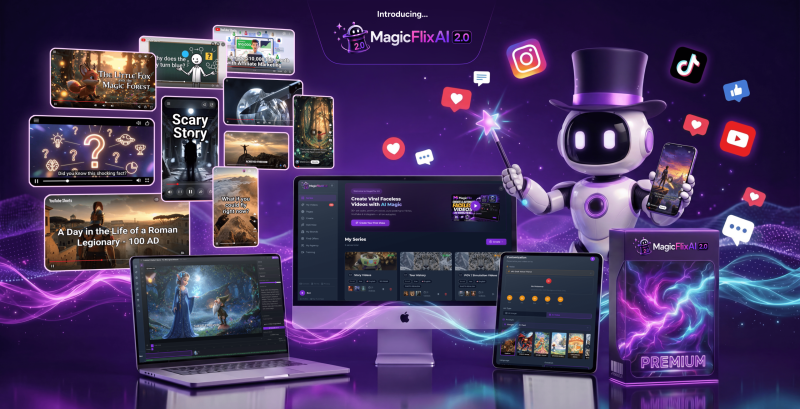
Instead of focusing only on generating individual AI videos, the platform helps users build a channel identity, create recurring content, schedule publishing, optimize videos for discovery, and connect their content with different monetization methods.
One of the most interesting additions is its Channel Brain technology. This allows users to give the AI information about a brand, product, business, offer, website, or preferred style so future content can follow a more consistent direction.
MagicFlixAI 2.0 officially launches on August 18, 2026, with entry-level access starting at $37 during the launch period.
In this MagicFlixAI 2.0 review, I will explain what the software does, how it works, its main features, who it is best suited for, pricing, optional upgrades, advantages, limitations, and whether it is worth considering for faceless video creation.
Affiliate disclosure: This article may contain affiliate links. If you purchase through one of these links, I may receive a commission at no additional cost to you.
Overview Of MagicFlixAI 2.0

| Details | MagicFlixAI 2.0 |
| Creator | Ben Murray / AtlasWebSolutions |
| Product | MagicFlixAI 2.0 |
| Product Type | AI faceless video and channel automation platform |
| Launch Date | August 18, 2026 |
| Front-End Price | Starts at $37 |
| Main Modes | Manual, Automatic, AI Agent |
| Starter Limit | Up to 3 channels and 50 videos per month |
| Premium Limit | Up to 50 channels and 1,000 videos per month |
| Commercial Rights | Available with Premium |
| Guarantee | 30-day money-back guarantee |
| Best For | Faceless creators, affiliate marketers, agencies, businesses, and video marketers |
What makes MagicFlixAI 2.0 interesting is that it treats the channel as the main project rather than treating every generated video as a separate task.
You can establish a channel direction, build content around it, create videos, schedule them, optimize them, and connect the audience with monetization options from the same broader workflow.
That gives the platform a different purpose from a basic text-to-video generator.
If you already know that you want more than the core front-end features, the MagicFlixAI 2.0 Bundle – $317 (one-time payment) is also worth checking. It combines several higher-level upgrades into one package, making it more suitable for users who need broader automation, agency-focused features, additional content tools, and higher-level functionality without purchasing each upgrade separately.
The Bundle is mainly aimed at serious creators, marketers, and agencies that expect to use multiple parts of the MagicFlixAI 2.0 ecosystem. If your goal is simply to test the platform or build a small number of channels, the front-end offer may be enough. But if you plan to scale, manage client projects, or use several advanced features, comparing the Bundle with the individual upgrades can help you decide which option gives you better overall value.
Add my code MAGIC to get $50 off the MagicFlixAI 2.0 Bundle Deal.
What Is MagicFlixAI 2.0?
MagicFlixAI 2.0 is an AI-powered platform designed to help users create, manage, grow, and monetize faceless video channels.
It offers three main ways to work.
You can manually create individual videos when you want more control.
You can use Automatic Mode to handle recurring content production.
Or you can activate AI Agent Mode and build a channel around an existing product, business, website, service, or offer.
The platform supports a wide range of channel ideas.
These include:
- POV simulations
- Historical recreations
- Trivia and brainteasers
- Documentary-style content
- Unreal ASMR
- Educational videos
- Scary stories
- Children’s stories
- Fantasy
- Mystery
- Science fiction
- Affiliate product reviews
- Motivational content
- Business content
- Product promotions
You are not limited to those prepared themes. You can also enter your own concept and develop a channel around it.
For content production, MagicFlixAI 2.0 combines script generation, AI images or video clips, AI narration, subtitles, music, and timeline editing.
After creating the video, users can continue into scheduling, topic research, keywords, titles, descriptions, hashtags, thumbnails, and monetization.
That broader workflow is the real focus of the product.
Who Came Up With This Idea?
MagicFlixAI 2.0 comes from Ben Murray and the AtlasWebSolutions team.
Ben Murray has been involved in internet marketing software for years, particularly products connected with video creation, AI, and online marketing.
Previous products associated with the team include DoodleMaker, VidToon 2.0, ARMagic, the original MagicFlixAI, OmniSitesAI, AIWhitelabels, GuruOS, Vidmonial, and VidCurator FX.
That background makes sense in the context of MagicFlixAI 2.0.
The new version expands beyond AI video generation and moves toward an all-in-one system for managing more of the complete faceless-channel process.
What Makes MagicFlixAI 2.0 Different?
The main difference is that MagicFlixAI 2.0 does not stop after producing a video.
Many AI video tools focus on one task.
You enter a prompt, generate a video, download it, and then move to other tools for everything else.
MagicFlixAI 2.0 tries to connect more stages together.
You can start with channel context, create the content, edit the video, schedule publication, improve its metadata, find content opportunities, and connect the channel with a monetization strategy.
The Channel Brain also makes the platform more interesting.
I could create a Channel Brain before building content and give the system information related to a business, brand, product, offer, or preferred content style.
That gives the AI more context when producing future content.
For example, an affiliate marketer could create a Channel Brain around a particular software niche.
A local business could create one around its services.
An agency could build one around a client’s brand.
A storytelling creator could use one to maintain a more consistent theme across multiple episodes.
This does not mean every generated video should be published automatically without review.
AI-generated scripts, visual choices, factual statements, and promotional claims should still be checked before publishing.
However, having persistent channel context can reduce the need to explain the same brand or product information again and again.
The Features Of MagicFlixAI 2.0
MagicFlixAI 2.0 includes a large number of functions, but several stand out because they directly affect how creators can build and manage channels.
Manual, Automatic & AI Agent Modes
The platform gives users three different creation approaches.
Manual Mode is useful when you want more control over individual videos.
Automatic Mode is designed for recurring channel production and scheduled publishing.
AI Agent Mode is built around turning a business, website, product, service, or offer into a focused content channel.
This flexibility is useful because not every project needs the same amount of automation.
If I were creating an important affiliate product review, I would probably want more manual control.
If I were running a recurring entertainment or storytelling channel, automation would become more valuable.
Having both options means users do not have to commit to a completely hands-off workflow.
Self-Learning Channel Brain
The Channel Brain is one of the most distinctive features.
I could give the system information related to my brand, niche, business, products, or preferred style before producing content.
The purpose is to help future videos follow a clearer and more consistent identity.
This can be especially useful when producing a large number of videos.
Without persistent context, AI-generated content can easily feel disconnected.
The Channel Brain attempts to reduce that problem by giving the system a reference point for the channel.
Affiliate marketers could use it to teach the platform about an offer or product category.
Businesses could use it to explain their services.
Agencies could create different Channel Brains for different clients.
Multiple Channel & Video Themes
MagicFlixAI 2.0 includes a broad range of channel concepts.
These include POV simulations, reconstructed history, trivia, documentaries, Unreal ASMR, storytelling, education, business topics, affiliate marketing, and promotional content.
There are also story themes such as scary stories, children’s stories, fantasy, mystery, science fiction, and Bible stories.
The value here is not simply the number of themes.
Prepared themes can help beginners get started without needing to design an entire channel format from scratch.
At the same time, custom concepts are still possible when you want something more original.
AI Visual Styles
MagicFlixAI 2.0 provides different AI image and video styles.
These can be used to shape the visual identity of a channel instead of giving every video the same generic appearance.
Available directions include realistic visuals, anime-style imagery, comic-inspired artwork, children’s visuals, sketch-based characters, and other stylized looks.
This can be useful when operating channels in different niches.
A history channel will probably need a different presentation from a children’s storytelling channel.
A software review channel may need something different again.
Choosing a consistent style can help make a channel more recognizable.
AI Voiceovers
MagicFlixAI 2.0 also includes AI narration.
Users can choose from voices with different accents, ages, personalities, and delivery styles.
This gives creators more flexibility when matching narration to the channel.
For example, a children’s story may need a very different voice from a documentary or business video.
Subtitles can also be synchronized with the narration.
That reduces another manual production task and can make the finished video easier to consume without sound.
Drag-And-Drop Timeline Editor
One of the most useful parts of the platform is the ability to make changes after the AI generates the initial video.
The built-in timeline allows users to work with scenes, timing, transitions, effects, narration, music, and visual assets.
If I did not like an AI-generated visual, I could replace it, regenerate it, or upload my own asset.
Scripts and prompts can also be reviewed before final rendering.
This is important because fully automatic generation is not always enough.
Sometimes the fastest workflow is to let AI create the first version and then manually improve the areas that matter most.
MagicFlixAI 2.0 gives users that option.
Character Continuity
Story-based AI videos often suffer from inconsistent characters.
A person may look one way in one scene and completely different in the next.
MagicFlixAI 2.0 includes character-continuity functionality designed to help recognizable characters remain more consistent across scenes and episodes.
This is particularly useful for recurring story channels.
If the audience is supposed to follow the same character through multiple scenes, visual continuity matters.
The platform supports videos up to around ten minutes in length.
Content Scheduling & Calendar
Creating a video is only part of running a channel.
You also need to publish consistently.
MagicFlixAI 2.0 includes scheduling and a built-in content calendar so users can see what is planned and when it is expected to publish.
Automatic Mode can take on more of this recurring workflow.
This becomes more valuable as the number of channels increases.
Manually publishing one video occasionally is easy.
Managing several channels with frequent uploads can become time-consuming.
A centralized calendar helps keep that process organized.
Viral Idea & Trend Research
MagicFlixAI 2.0 contains tools for discovering possible content ideas.
Users can explore topics based on niches, keywords, phrases, competitors, or URLs.
Ideas can be organized around concepts such as trending, evergreen, viral-style, or high-engagement content.
This can help creators move past one of the biggest problems in content marketing: deciding what to publish next.
However, no trend tool can guarantee that a video will become viral.
The research functionality should be viewed as a way to discover opportunities rather than predict results with certainty.
Keyword, Title, Description & Hashtag Tools
The platform also includes optimization tools.
These can help users work with keywords, hashtags, titles, descriptions, and thumbnails.
For creators who normally use separate software for those tasks, bringing them into the same dashboard could save time.
The important thing is to keep expectations realistic.
These tools may help improve how content is presented and optimized, but they cannot guarantee YouTube rankings, traffic, subscribers, or views.
Content quality and audience response still matter.
Affiliate Monetization
Affiliate marketers are one of the clearer target audiences for MagicFlixAI 2.0.
The platform can support review videos, comparisons, tutorials, educational content, and product recommendations.
Users can research offers and build relevant content around them.
Affiliate links can then be connected with the channel’s promotional workflow.
This gives marketers another way to create content around offers without relying entirely on blogs or email.
The most important requirement is relevance.
A channel will not become valuable simply because affiliate links are included.
The content still needs to solve problems, answer questions, or entertain the right audience.
Lead Generation Pages
MagicFlixAI 2.0 also includes tools for building pages around the video audience.
Users can create lead-generation pages designed to collect email addresses.
Another option is building a store-style page around several offers.
This can be useful because social media platforms are rented traffic sources.
Building an email list gives marketers another way to maintain contact with an audience outside the platform.
Agency Tools
The platform can also support agencies and freelancers.
AI Agent technology can be used to create channels around client businesses.
Agency-related pages can help users present video and channel services.
Higher-level upgrades expand this further with additional client accounts, agency licenses, white-label features, and team management.
This makes MagicFlixAI 2.0 more interesting for service providers who want to use AI video production commercially.
And if that wasn’t enough – with MagicFlixAI 2.0, you’ll also get these bonus features:
How Does MagicFlixAI 2.0 Work?
The workflow becomes much easier to understand when broken into stages.
Step 1 – Build Your Channel Brain
I could begin by creating a Channel Brain.
This is optional, but it can be useful when I want the system to understand a particular product, brand, niche, or content style.
I can add relevant information and use that context to influence future videos.
For a serious branded channel, this is a step I would not skip.
Step 2 – Choose Your Creation Method
Next, I can decide how I want to work.
I can create an individual video manually.
I can build an automated channel.
Or I can use AI Agent Mode to turn information about a business, website, product, service, or offer into a channel concept.
Beginners may prefer to start manually so they understand the workflow.
Once they become comfortable with the platform, automation can take over more repetitive tasks.
Step 3 – Select The Publishing Destination
The next stage is choosing the intended publishing platform.
MagicFlixAI 2.0 supports major video and social platforms such as YouTube, TikTok, Instagram, and Facebook depending on the plan.
The available publishing options are broader in the Premium edition than in Starter.
Step 4 – Pick A Channel Theme
I can then choose from one of the prepared channel styles or enter my own custom idea.
This is where I decide whether the content will focus on storytelling, education, entertainment, affiliate offers, business topics, or another niche.
If I already created a Channel Brain, I can use that context to guide the channel.
Step 5 – Configure The Production Style
The platform then lets me choose the creative direction.
I can select a narrator, choose whether the video will use images or AI video clips, choose a visual style, and add elements such as subtitles and background music.
This stage matters because channel identity is not only about the topic.
The voice, visuals, pacing, and presentation all affect how the final content feels.
Step 6 – Review Scripts & Visuals
Before finishing the video, I can review the generated script and visuals.
I can adjust prompts, replace visual assets, or upload my own material.
This is one of the most important stages.
AI can save a lot of time creating the first version, but creators should still verify facts, wording, visual relevance, and promotional claims before publishing.
Step 7 – Edit On The Timeline
The built-in timeline gives me additional control.
I can adjust scenes, change timing, modify transitions, replace visuals, edit narration, and work with music.
After making changes, I can render the video again and review the updated result.
This makes the workflow more flexible than a simple one-click generator.
Step 8 – Schedule Your Content
Once the video is ready, I can schedule it.
The built-in calendar makes it easier to manage upcoming content and see what is planned.
Automatic Mode is particularly useful for recurring publishing.
This could save considerable time for creators running multiple channels.
Step 9 – Optimize The Video
Before publishing, MagicFlixAI 2.0 can help with optimization.
I can work on:
- Keywords
- Hashtags
- Titles
- Descriptions
- Topic opportunities
- Thumbnails
This helps reduce the number of tools needed between video creation and publication.
Step 10 – Add A Monetization Path
Finally, I can decide what business goal the content should support.
That could involve affiliate products, lead generation, sponsorship outreach, or agency services.
This final stage is what pushes MagicFlixAI 2.0 beyond simple video generation.
The system is designed around building a channel that can support a broader marketing strategy.
Curious about how it works? Watch the demo video below for an in-depth overview:
Who Is It The Most Suitable For?
MagicFlixAI 2.0 is most suitable for people who plan to create video content consistently.
Faceless YouTube creators can use it to build channels without appearing on camera.
Affiliate marketers can create product reviews, comparisons, tutorials, and educational videos around relevant offers.
Small businesses can use AI Agent Mode to create recurring content around their services.
Agencies and freelancers can use the platform to produce videos or channels for clients.
Story creators can benefit from the available themes, episodic content options, and character continuity.
Existing creators may also find value in the scheduling and automation features if they want to increase publishing volume.
There are situations where another tool could make more sense.
If you only need an occasional AI video, a simpler video generator may be enough.
If you already have professional editing, scheduling, keyword research, and publishing tools that you enjoy using, replacing them may not provide much additional value.
Advanced professional editors may also prefer dedicated editing software when they need deeper timeline and frame-level control.
MagicFlixAI 2.0 makes the most sense when you want an integrated workflow rather than one isolated AI feature.
Why People May Want It?
The strongest reason to consider MagicFlixAI 2.0 is convenience.
Creating faceless content often requires several tools.
One handles scripting.
Another creates visuals.
Another generates voiceovers.
Another edits video.
Another researches keywords.
Another schedules content.
Another creates landing pages.
MagicFlixAI 2.0 attempts to reduce that fragmentation.
Its value comes from connecting more of those stages inside the same environment.
The Channel Brain is another feature I find particularly useful.
Instead of explaining the same brand, product, or niche every time I create a new video, I can establish that information earlier and use it as ongoing context.
I also like that automation is optional.
Users who want control can work manually.
Users who want more volume can automate more of the process.
That is better than forcing everyone into a completely hands-off system.
The monetization options also make sense for marketers.
Rather than depending entirely on platform advertising, users can connect videos with affiliate offers, lead generation, sponsorships, or client services.
That does not guarantee revenue.
What it does provide is a more complete structure for turning content into a business asset.
For the right user, having production, optimization, scheduling, and monetization closer together could reduce a significant amount of repetitive work.
The Pricing
MagicFlixAI 2.0 is offered in two main front-end editions during the launch:
MagicFlixAI 2.0 Starter – $37 one-time
Starter is the lower-cost entry option.
It includes Manual Mode, YouTube-focused publishing, story themes, AI image styles, voiceovers, and basic video production features.
The documented limits include up to 3 channels and 50 videos per month.
This plan is most suitable for someone who wants to test the platform before committing to a larger setup.
MagicFlixAI 2.0 Premium – $97 one-time
Premium expands the platform significantly.
It includes Manual Mode, Automatic Mode, AI Agent Mode, additional themes, more publishing options, broader visual capabilities, character continuity, subtitles, scheduling, monetization features, ranking tools, timeline editing, and commercial rights.
The documented allowance increases to as many as 50 channels and 1,000 videos per month.
Between the two options, Premium offers much more than simply higher limits.
It unlocks many of the features that make MagicFlixAI 2.0 different from a basic AI video creator.
Starter makes sense for testing.
Premium makes more sense for users who already know they want automation, multiple channels, commercial use, and broader publishing capabilities.
A 30-day money-back guarantee is also included.
Because launch pricing and funnel offers can change, buyers should always review the current checkout page before purchasing.
The Upsells
MagicFlixAI 2.0 also has several optional upgrades.
These are mainly intended for users who want higher capacity, agency capabilities, international content, white-label functionality, or additional production tools.
OTO 1: MagicFlixAI 2.0 Gold – $97 >>More Details<<
Gold focuses on scaling.
It expands creation capacity and adds more advanced channel, agency, theme, rendering, and production functionality.
This upgrade makes more sense for users already operating several channels or serving clients.
OTO 2: MagicFlixAI 2.0 Elite – $67 >>More Details<<
Elite focuses more heavily on international and agency use.
It adds functionality such as multilingual video creation, expanded voice options, additional agency tools, and branding-related capabilities.
This is more useful for people working across markets rather than someone running one personal channel.
OTO 3: MagicFlixAI 2.0 Platinum – $127 >>More Details<<
Platinum moves further into agency operations.
It is aimed at users who want additional client capacity, team functionality, white-label capabilities, and more advanced agency features.
This is unlikely to be necessary for the average beginner.
OTO 4: Audio2Video – $37 >>More Details<<
Audio2Video is designed for repurposing existing audio.
Users with podcasts, interviews, voice notes, training recordings, or other spoken content can turn that material into video.
This can be useful if you already have a library of audio content and want to publish it in visual formats.
OTO 5: Voicely – $39 >>More Details<<
Voicely expands the AI narration side of the ecosystem.
It is intended for users who need more voiceover flexibility or produce larger volumes of narrated content.
The important point is that these upgrades are optional.
You do not need to buy everything.
The better approach is to identify which capabilities you actually need and only consider the upgrades that solve a specific problem.
The Bundle Offer
MagicFlixAI 2.0 also offers a bundle that combines several upgrades.
This type of package is most useful for buyers who already expect to use multiple higher-level features.
An agency owner, for example, may want client accounts, international content, white-label capabilities, team access, and additional production tools:
In that situation, a bundle may be more practical than buying individual upgrades separately.
A beginner creating one faceless YouTube channel has much less reason to purchase everything.
The best way to judge the bundle is not by looking at the total advertised retail value.
Instead, write down the upgrades you would actually use.
Then compare the cost of those individual capabilities with the current bundle price.
That gives you a much clearer picture of whether the bundle is worthwhile for your situation.
Add my code MAGIC to get $50 off the MagicFlixAI 2.0 Bundle Deal.
Pros & Cons
Pros
- Combines video creation, channel management, scheduling, optimization, and monetization in one broader workflow.
- Offers Manual, Automatic, and AI Agent creation modes.
- Channel Brain can help maintain better brand and content consistency.
- Supports many channel styles and content niches.
- Includes AI scripts, visuals, narration, subtitles, and music.
- Built-in timeline editor allows manual refinement.
- Character continuity is useful for story-based videos.
- Scheduling and content-calendar tools can reduce repetitive publishing work.
- Keyword, title, description, hashtag, and thumbnail tools support optimization.
- Affiliate marketing, lead generation, sponsorship, and agency use cases are supported.
- Suitable for both personal channels and commercial projects depending on the plan.
- Premium provides significantly higher limits than Starter.
- Includes a 30-day money-back guarantee.
Cons
- The large number of tools means new users still need time to understand the complete workflow.
- AI-generated scripts and visuals should be reviewed before publishing.
- Optimization tools cannot guarantee rankings, traffic, or viral results.
- Monetization features do not guarantee affiliate sales, clients, or sponsorship revenue.
- Some advanced agency and white-label capabilities require optional upgrades.
- Users who already have a complete professional video-production stack may not need every feature.
- Advanced editors may still prefer dedicated professional editing software.
- Funnel pricing and upgrade offers may change over time.
Is MagicFlixAI 2.0 Legit?
MagicFlixAI 2.0 is a real software platform with a defined workflow and multiple editions.
The product is not simply a collection of marketing promises.
Users can work with channel setup, Channel Brain technology, AI video creation, visual styles, narration, subtitles, timeline editing, scheduling, optimization, and monetization tools.
There is enough functionality here to understand what the platform is designed to do.
The more important question is whether buyers maintain realistic expectations.
MagicFlixAI 2.0 can automate and simplify parts of faceless content creation.
It cannot guarantee that a channel will rank.
It cannot guarantee viral videos.
It cannot guarantee affiliate commissions.
It cannot guarantee clients or sponsorships.
Success still depends on niche selection, content quality, audience interest, publishing consistency, offer relevance, and marketing strategy.
That is how I would evaluate the product.
The software can provide a useful production and management system.
The business results still depend on how well the user applies it.
Conclusion
MagicFlixAI 2.0 is most interesting when viewed as a faceless-channel platform rather than just another AI video generator.
Its main strength is bringing several related tasks together.
You can establish channel context, choose a theme, generate scripts and media, select narration, add subtitles, edit scenes, schedule publishing, work on optimization, and connect the channel with different monetization methods.
That is a much broader workflow than simply entering a prompt and receiving a finished video.
For someone who only wants to test basic AI video creation, the Starter edition provides a lower-cost entry point.
For users who already plan to build multiple channels, automate content, publish commercially, and use broader marketing features, Premium appears considerably more useful.
I would be more selective with the optional upgrades.
Gold, Elite, Platinum, Audio2Video, and Voicely serve different purposes, and not every buyer needs them.
The biggest mistake would be expecting automation to replace strategy.
You still need to choose good topics, review AI-generated content, understand your audience, publish consistently, and connect videos with offers that genuinely fit the viewer.
MagicFlixAI 2.0 does not eliminate that work.
What it may do is reduce much of the repetitive production and channel-management work surrounding it.
For faceless creators, affiliate marketers, agencies, and businesses that plan to publish video regularly, MagicFlixAI 2.0 is a strong product to consider during its 2026 launch.
Frequently Asked Questions
Do I need technical skills to use MagicFlixAI 2.0?
The platform is designed for users without professional video-editing or coding experience. It provides a guided workflow and training materials to help beginners get started.
Do I need my own API keys?
Personal API keys are not required to begin using the main documented workflow.
Can MagicFlixAI 2.0 create complete faceless channels?
Yes. Depending on your edition, you can manually create individual videos, automate recurring channel production, or use AI Agent Mode to build content around a business, product, service, website, or offer.
Can it create videos for social media?
Yes. The platform supports major video and social content formats, including YouTube, TikTok, Instagram, and Facebook depending on the plan.
Can affiliate marketers use MagicFlixAI 2.0?
Yes. Affiliate marketers can use it for reviews, comparisons, tutorials, educational content, product-focused videos, and other relevant promotional formats.
Can I use it for client work?
Commercial rights are included with the documented Premium edition, while higher upgrades expand the available agency and client-management capabilities.
How long can MagicFlixAI 2.0 videos be?
The documented maximum video length is up to approximately ten minutes.
Does MagicFlixAI 2.0 guarantee rankings or views?
No. It provides tools that can help with topics, keywords, titles, descriptions, hashtags, and thumbnails, but rankings and traffic cannot be guaranteed.
Is there a refund policy?
Yes. MagicFlixAI 2.0 is offered with a 30-day money-back guarantee.
Should I choose Starter or Premium?
Starter is better for testing basic faceless video creation with lower limits. Premium is more suitable if you need automation, AI Agent Mode, multiple channels, broader publishing support, commercial rights, scheduling, optimization, and monetization features.
MagicFlixAI 2.0 is an AI-powered faceless video and channel automation platform that helps users create videos, manage channels, schedule content, optimize uploads, and support monetization from one dashboard.
Product Brand:
Ben Murray
Product Currency:
USD
Product Price:
37
Product In-Stock:
InStock MagicFlixAI 2.0
4.5
12 practical resources for video marketing, social media, email, list building, funnels, and affiliate marketing.
***3 STEPS TO CLAIM THIS BONUSES***
Step 1: Purchase MagicFlixAI 2.0 through my MagicFlixAI 2.0 Review page:
Step 2: Complete your order successfully using my affiliate link.
Step 3: That’s it! Your exclusive bonuses will be automatically delivered to you after your purchase is successfully completed.
No need to send your receipt or contact support. Simply complete your order and get instant access to your bonuses.

