
Cinematic Sites AI Review
Build Cinematic 3D Websites From One Prompt
Building a professional business website usually involves far more than picking a template and changing a few colors.
You may need persuasive copy, responsive layouts, graphics, animations, hosting, SSL, lead forms, appointment booking, payment options, SEO settings, analytics, and a practical way to manage everything after the site goes live.
For freelancers and agencies, the workload becomes even heavier. Every new client can mean another website, another set of assets, another login, another lead-management process, and another handover workflow.
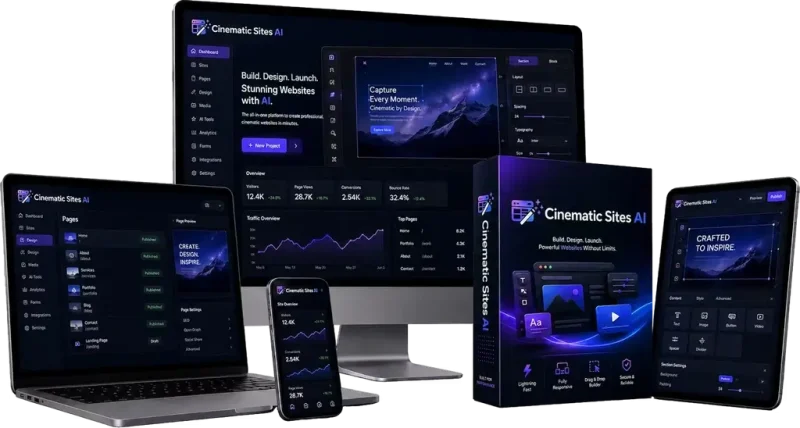
Cinematic Sites AI is designed to simplify that process.
Created by Yogesh Agarwal, it is an AI-powered website creation and business growth platform that helps users turn a simple business description into a complete website without building every section manually.
Instead of starting with a blank canvas, you create a workspace, describe the business, select the visual direction, choose the business modules you want, and let a group of specialized AI agents build the initial website.
The platform goes beyond basic page generation as well. It includes tools for visual editing, prompt-based website changes, custom domains, hosting, lead capture, appointment scheduling, payment collection, AI visitor assistance, analytics, prospecting, outreach, and client management.
That makes Cinematic Sites AI particularly interesting for entrepreneurs, local businesses, freelancers, marketers, and agencies that want a more centralized website workflow.
In this Cinematic Sites AI review, I’ll explain what the platform does, how the website creation process works, the major features, who it suits, the pricing structure, the optional upgrades, its strengths and limitations, and whether it is worth considering.
Affiliate disclosure: This review may contain affiliate links. If you purchase through them, I may receive a commission at no additional cost to you. My assessment focuses on whether the product makes sense for its intended users.
Overview Of Cinematic Sites AI

| Product | Cinematic Sites AI |
| Creator | Yogesh Agarwal |
| Product Type | AI website builder and business website platform |
| Launch Date | August 21, 2026 |
| Front-End Price | $36.95 one-time during the stated launch offer |
| Discount Code | CSAI4off for $4 off |
| Refund Policy | 30-day money-back guarantee |
| Best For | Entrepreneurs, freelancers, agencies, marketers, consultants, and local businesses |
| Main Strength | Combines AI website generation with business-management features |
| Skill Level | Beginner-friendly |
| Coding Required | No coding required for the standard workflow |
| Commercial Use | Commercial capabilities are included |
The core idea behind Cinematic Sites AI is straightforward.
You describe the website you want, choose how you want it presented, select the business functions you need, and allow the AI system to assemble the first version for you.
From there, you can refine the design, update the copy, connect a domain, manage leads, schedule appointments, accept payments, or provide access to a client.
The front-end launch price is listed at $36.95 as a one-time payment, with the code CSAI4off providing a $4 discount.
As with most launch offers, the final checkout price and available limits may change over time.
What Is This App?
Cinematic Sites AI is an AI-assisted website creation platform built to handle more of the website workflow from inside one dashboard.
The basic process starts with information about the business.
You can describe what the company does, choose a design direction, add contact details, configure optional modules, and allow the system to generate the website.
The platform places particular emphasis on cinematic visuals.
Rather than relying only on conventional flat page layouts, Cinematic Sites AI can build websites with animated sections, depth, motion, lighting effects, and more immersive presentation styles.
That does not mean every website needs to look dramatic.
A local plumber, dentist, consultant, or accountant may prefer something cleaner and more restrained.
However, businesses in areas such as hospitality, real estate, travel, creative services, entertainment, technology, restaurants, events, or premium services may benefit more from the visual style the platform is designed to create.
Cinematic Sites AI also extends beyond design.
The platform includes website lead management, appointment functionality, AI visitor assistance, payments, client workspaces, outreach tools, analytics, custom domains, hosting, and website export.
That broader setup makes it closer to a website-and-business platform than a simple AI page generator.
Who’s Behind The Creation?
Cinematic Sites AI was created by Yogesh Agarwal.
He has been involved with several AI-focused digital products, including Claw Agents AI and AI Talker.
His products generally follow a similar philosophy: bring several business or content tasks into one AI-driven environment instead of requiring users to combine many separate tools.
Cinematic Sites AI applies that approach to website creation.
Rather than separating design, copywriting, branding, lead capture, appointment scheduling, visitor interaction, client management, and outreach into completely different systems, the platform attempts to connect them around the website itself.
For small businesses and service providers, that approach can be practical.
A website is rarely useful simply because it looks good.
The real business goal is normally to help visitors understand the offer and then take a useful action, such as contacting the business, requesting information, booking an appointment, or making a payment.
The Features Of Cinematic Sites AI
Cinematic Sites AI includes a large collection of features, but several stand out as the most important.
Cinematic 3D Motion Website Generator
This is the central feature.
You can begin with a short description of the business and allow the system to create a complete website structure around it.
The generated site can include animated sections, motion effects, visual depth, cinematic-style transitions, modern layouts, and business-specific content.
This can reduce the amount of manual setup needed when you want something more visually distinctive than a basic template.
For example, a boutique travel business could use cinematic imagery and scroll effects to create a stronger emotional presentation.
A local service business could use the same platform in a simpler way, focusing more on service explanations, trust elements, contact forms, and appointment booking.
The benefit is flexibility.
You are not limited to manually designing every page section before you can see what the website could look like.
AI Prompt-Based Website Editor
After the initial website is generated, you can continue changing it by describing what you want.
Instead of manually adjusting every element, you can type instructions for the system to modify sections, copy, layouts, or other supported website components.
This makes the editing workflow more approachable for beginners.
Someone who knows what they want changed but does not know how to code can still communicate the desired result in normal language.
Prompt editing also makes experimentation easier.
You could start with a simple hero section, ask for a more premium tone, refine the call to action, or adjust the structure without rebuilding the entire website manually.
Complete Visual Drag & Drop Builder
Cinematic Sites AI also includes visual editing controls.
This gives users another way to refine generated pages without depending entirely on prompts.
That combination is useful.
AI generation is fast, but sometimes you simply want to move, remove, or adjust something visually.
Having both prompt-based editing and direct visual control makes the workflow more practical than relying on one editing method alone.
Prompt Mode And Details Mode
The website setup process gives users different ways to provide information.
Prompt Mode is the easier option.
You describe the business and the type of website you want in ordinary language.
This is useful when you want the AI to interpret more of the design direction.
Details Mode provides a more structured setup.
You can enter information such as the business name, business description, location, phone number, and email address.
There is also an AI enhancement option designed to help improve rough business descriptions.
This gives beginners a simpler starting point while still allowing more detailed users to provide structured information.
AI Logo And Branding Options
During website setup, you can work with an existing logo or use the available AI branding options.
For a new project, quick prototype, campaign site, or client concept, this can save time.
For an established company, I would normally recommend using the real brand assets rather than replacing them unnecessarily.
AI-generated branding is useful as a starting point, but it should not automatically override an existing brand identity.
Quick And Full Polished Creation Modes
Cinematic Sites AI allows users to choose between a quicker build and a more elaborate visual experience.
Quick Mode is designed for a cleaner and faster setup.
Full Polished Mode focuses more on cinematic presentation, advanced motion, and richer visual effects.
This matters because not every site needs the same level of animation.
For a simple local lead-generation website, speed and clarity may matter more than visual complexity.
For a hotel, creative studio, travel company, premium property service, or entertainment brand, a more immersive presentation may be more appropriate.
Download And Own Your Website
One of the more useful features is the ability to export generated websites.
The platform includes HTML export, allowing users to download the website rather than being completely dependent on the platform for permanent hosting.
Website portability is especially important for commercial users.
A freelancer or agency may want the flexibility to deliver the site differently depending on the client.
A business owner may simply prefer to maintain greater control over their website files.
Custom Domain Connection
Cinematic Sites AI allows websites to use custom domains.
Users can also work with available subdomain options when they want to launch something quickly.
For a real business website, a custom branded domain will normally provide the more professional long-term setup.
Hosting And SSL
Hosting and SSL are included with the platform.
That reduces the number of technical steps needed before publishing.
A beginner does not have to create the site in one system and then immediately figure out separate hosting and SSL configuration just to get it online.
The specific hosting limits depend on the package, so agencies and users planning multiple sites should check the limits attached to the edition they purchase.
AI Lead Capture And Generation System
Cinematic Sites AI includes lead-generation functionality that can be enabled for individual websites.
When visitors submit their information through the website, those enquiries can be managed through the corresponding lead area.
This creates a more useful connection between the website and the business.
Instead of simply building a page and hoping visitors take action, the platform gives users a structured place to manage incoming prospects.
For consultants, agencies, contractors, local businesses, coaches, and other service providers, this can be more valuable than another design effect.
Smart Appointment And Calendar Booking
Appointment functionality can also be added to websites.
The business can define appointment types and allow visitors to select suitable booking times.
The booking then becomes part of the website-management workflow.
This can be useful for businesses such as:
- consultants
- agencies
- coaches
- real estate professionals
- clinics
- salons
- service providers
- local professionals
A visitor can move directly from reading about the business to scheduling the next step.
AI Sales Chatbot
Cinematic Sites AI includes an AI visitor assistant.
It can use business, service, and package information to interact with website visitors.
Its practical purpose is to answer common questions, collect lead information, and help visitors move toward the next action.
That could be a contact request, appointment, or another conversion step.
I would not interpret this as a guarantee that an AI chatbot will automatically close sales.
The more realistic benefit is that visitors can interact with the business without always waiting for a human response.
One-Click Payment Integration
Payment functionality can also be enabled.
The workflow allows business owners to provide product or package information and configure supported payment details.
This makes Cinematic Sites AI useful for more than simple informational websites.
A consultant, freelancer, service provider, or digital business could potentially present an offer and allow visitors to proceed toward payment from the same site.
Businesses with complicated ecommerce requirements should still check whether the platform supports their exact checkout, tax, inventory, subscription, and payment needs.
Lead Generator
Cinematic Sites AI includes a prospecting feature aimed particularly at freelancers and agencies.
You can search for businesses in selected markets and add prospects to a lead pipeline.
For example, a website freelancer could look for local plumbers, restaurants, dentists, or other businesses that may need a stronger website.
Those prospects can then move into the outreach workflow.
This is an important difference from website tools that help you build sites but provide no assistance with finding potential clients.
Outreach Studio
The Outreach Studio supports the next part of the agency workflow.
Prospects can be organized and contacted using available outreach templates and pipeline tools.
This gives freelancers a more connected process:
- Find businesses.
- Add them to the pipeline.
- Prepare outreach.
- Build a site.
- Deliver it.
- Manage the client afterward.
That is potentially more efficient than keeping everything in unrelated apps.
White-Label Client Dashboards
Client management is one of the strongest agency-oriented features.
Clients can receive their own administration access rather than logging into the agency owner’s main account.
Their dashboard can give them access to relevant areas such as leads, bookings, website activity, or analytics.
This creates a more professional handover experience.
Instead of sending a client a website and leaving them with no ongoing management environment, the agency can provide a dedicated access point connected to the service.
Analytics
Cinematic Sites AI also includes website analytics.
Users can monitor activity across their projects and view relevant business data from the dashboard.
For small businesses and agencies, having basic website, lead, and appointment information in one place can reduce dashboard switching.
Users who require advanced advertising attribution or highly detailed enterprise analytics may still need specialist platforms.
How Does Cinematic Sites AI Work?
The website-building process follows a structured workflow.
Step 1: Create A Workspace
The first step is creating or selecting a workspace.
For a single business owner, one workspace may be enough.
For freelancers or agencies, separate workspaces can be used to keep different client projects organized.
This helps separate websites, leads, appointments, and related client data.
Step 2: Start A New Website
Inside the workspace, choose the option to create a new site.
The system then guides you through the setup process.
Step 3: Choose The Business Type And Design Direction
Select the relevant business category or use the custom option if needed.
Next, choose the visual style.
You can select a more cinematic presentation or a 3D-oriented experience depending on the type of site you want to create.
The right choice depends on the business.
A luxury travel website may benefit from richer movement.
A local professional service may benefit from a cleaner layout with fewer distractions.
Step 4: Add The Business Information
You can choose between Prompt Mode and Details Mode.
Prompt Mode lets you give the system a natural-language description.
For example, you could describe a boutique travel company, a local dental practice, a marketing agency, or a restaurant.
Details Mode lets you enter more structured business information.
This is useful when you already know the exact company details you want included.
Step 5: Add Or Generate Branding
The next step involves the logo and visual identity.
You can use an existing business logo or work with available AI branding options.
For client projects, using the client’s existing assets is normally the safest approach when they are available.
Step 6: Select The Build Mode
Choose between the faster setup and the more polished cinematic option.
The quicker mode is suitable when you want a simpler website foundation.
The polished option is more appropriate when the visual presentation is part of the business positioning.
Step 7: Configure The Domain
Choose an available subdomain for quick deployment or connect a custom domain.
A subdomain can be useful for testing or presenting a concept.
A custom domain is generally the better choice for a permanent business website.
Step 8: Select The Business Modules
This is where you decide what the website should actually do.
Depending on your requirements, you can configure supported functions such as:
- lead generation
- appointment booking
- AI visitor assistance
- payment options
- SEO-related settings
- search-friendly structure
This allows the website to be built around a practical business objective.
Step 9: Generate The Website
Once the setup is complete, start the generation process.
The system handles several stages behind the scenes, including interpreting the business, preparing the brand direction, creating sections, generating content, building visual elements, and configuring selected website functions.
The result is an initial website that you can review rather than a completely blank project.
Step 10: Review And Edit
After generation, the website appears in the Sites area.
You can then review the design, copy, business information, calls to action, and enabled modules.
Changes can be requested through prompt-based editing.
More direct editing options are also available.
This review step should never be skipped.
AI-generated business copy should be checked for accuracy before publication.
Phone numbers, addresses, pricing, service claims, testimonials, policies, legal statements, and contact details should always be verified by the website owner.
Step 11: Publish Or Export
Once the website is ready, you can publish through the available hosting environment or export the website.
The export function provides more flexibility for users who want greater control over where the final site lives.
Step 12: Manage Leads, Appointments And Clients
The workflow continues after publishing.
You can manage captured leads, monitor appointments, review website activity, work with prospects, and provide client access when required.
This is where Cinematic Sites AI becomes more than a website-generation tool.
It attempts to support the business activity happening around the website as well.
For a thorough exploration of the platform, be sure to check out the demo video below:
Discount Code: CSAI4off for $4 off
Who Should Try Cinematic Sites AI?
Cinematic Sites AI is likely to be most useful for several types of users.
Freelancers
Freelancers who build websites for clients may benefit from the combination of AI generation, editing, hosting, export, prospecting, outreach, and client access.
It could reduce the amount of repetitive setup required for smaller client projects.
Agencies
Agencies are one of the clearest audiences.
Workspaces, client dashboards, commercial functionality, lead management, and outreach tools make more sense when you are handling multiple businesses rather than building only one website.
Local Marketers
Local marketing professionals can use the platform to create websites for businesses such as restaurants, dentists, salons, gyms, contractors, consultants, real estate companies, and local service providers.
The built-in lead and booking features fit these businesses particularly well.
Entrepreneurs
Entrepreneurs who want a website but do not want to learn coding may find the prompt-based setup easier than conventional development.
The biggest benefit is being able to combine several business functions without immediately subscribing to several different services.
Consultants And Coaches
Lead capture, appointments, service descriptions, visitor interaction, and payment functionality can make the platform suitable for consultants and coaches.
Creative Businesses
Businesses that depend more heavily on presentation may appreciate the cinematic direction.
Travel, hospitality, design, photography, premium services, property, entertainment, events, and creative agencies are examples.
Cinematic Sites AI may be less suitable for users who need complete custom development, complicated enterprise integrations, highly specialized ecommerce systems, or very granular code-level control.
Why Is It Worth Checking Out?
The strongest argument for Cinematic Sites AI is not simply that it can generate a website with AI.
Many tools can now do that.
The more interesting part is how much of the wider website workflow is connected around the generated site.
A typical freelancer may otherwise use:
- one website builder
- a separate hosting provider
- a form service
- a booking platform
- a chatbot
- a CRM
- an outreach tool
- an analytics platform
- a separate client portal
Cinematic Sites AI tries to reduce that fragmentation.
For suitable users, the workflow can look more like this:
- Find a prospect.
- Create the project.
- Generate the website.
- Edit the result.
- Connect the domain.
- Capture leads.
- Book appointments.
- Monitor activity.
- Give the client their own access.
That is a much broader value proposition than simply producing page layouts.
The cinematic design system also gives the product a clearer identity.
Many fast AI website builders tend to create predictable sections with relatively standard styling.
Cinematic Sites AI instead focuses on richer movement, visual depth, animated scenes, and more immersive presentation.
That will not automatically make a website better.
Good website design still depends on clarity, usability, speed, relevance, accessibility, and how well the page supports the business goal.
However, having a stronger visual starting point can be useful when appearance is important to the offer.
Another meaningful advantage is website portability.
Users can export their site instead of being completely locked into one hosted environment.
That matters for freelancers, agencies, and business owners who want more control.
The commercial opportunity is also worth understanding realistically.
Cinematic Sites AI can make it easier to produce websites for clients.
It does not guarantee that clients will pay a particular amount.
A professional website service still depends on understanding the client’s business, creating accurate content, managing revisions, providing support, communicating well, and delivering something that actually helps the customer.
The same applies to SEO.
The platform can help create a search-friendly foundation.
That does not guarantee Google rankings.
Ranking performance depends on competition, content, backlinks, authority, technical quality, search intent, and ongoing optimization.
Used with realistic expectations, Cinematic Sites AI makes the most sense as a production and business-management tool rather than a shortcut to guaranteed traffic or income.
The Price
The stated launch price for Cinematic Sites AI is $36.95 as a one-time payment.
The discount code CSAI4off is listed as providing $4 off the front-end purchase.
The offer also includes a 30-day money-back guarantee.
For users who only need the main website-building functionality, starting with the front-end edition may make more sense than immediately purchasing every available upgrade.
Freelancers and agencies should pay closer attention to usage limits because the number of sites, workspaces, clients, leads, AI actions, hosting resources, and other allowances can vary by package.
Launch pricing may also change, so checking the final checkout amount before purchasing is sensible.
The OTO Details
Cinematic Sites AI includes several optional upgrades.
These are not automatically required for every buyer.
Upgrade 1: Cinematic Sites AI Advanced Edition >>More Details<<
The Advanced Edition is listed at $67 one-time.
It expands the platform for users who need more website-management capacity, business tools, client functionality, lead features, appointments, AI assistance, and other higher-level capabilities.
This upgrade is more relevant to freelancers and businesses planning to use the platform regularly.
Upgrade 2: Cinematic Sites AI Pro Edition >>More Details<<
The Pro Edition is listed at $97 one-time.
It focuses on more advanced AI, customization, marketing, SEO, lead-management, analytics, and conversion-oriented functionality.
Users who want more control beyond the core website generator are the most likely to consider this upgrade.
Upgrade 3: Done-For-You Edition >>More Details<<
The Done-For-You Edition is listed at $147 one-time.
This option is aimed at users who prefer to have more of the website setup handled for them.
Instead of doing the entire build themselves, buyers provide their requirements and the service is positioned around assisting with design, content, configuration, integrations, and launch.
This may appeal to someone who likes the platform but does not want to spend much time building the project personally.
Upgrade 4: Agency Edition >>More Details<<
The Agency Edition is listed in the $127 to $147 one-time range.
This version is designed primarily for users who want to create and manage websites for clients.
Its value is tied to commercial use, multiple projects, client delivery, and agency-style management.
If you plan to use Cinematic Sites AI mainly for your own business, this upgrade may not be necessary.
Upgrade 5: Claw Agents AI Edition >>More Details<<
Claw Agents AI is listed at $37 one-time.
It is a separate AI productivity platform with specialized agents for areas such as content, marketing, sales, research, SEO, support, social media, and business tasks.
It expands the overall AI toolkit but is not required for the core Cinematic Sites AI website workflow.
Upgrade 6: AI Talker Edition >>More Details<<
AI Talker is listed at $37 one-time.
It is a separate browser-based AI voice platform designed for generating voiceovers from text.
Again, this is an additional product rather than something required to create websites inside Cinematic Sites AI.
A larger bundle has also been listed with the core platform and several upgrades combined.
The best choice depends on what you actually need.
A solo business owner building one website should not automatically assume the complete funnel is necessary.
Agencies and freelancers are more likely to benefit from the expanded packages.
The Bundle Offer
The Cinematic Sites AI Bundle is listed at $267 one-time after applying coupon CS100, which gives $100 off.
It includes:
- Cinematic Sites AI Core
- Advanced Edition
- PRO Edition
- Done-For-You Edition
- Agency Edition
The bundle is best suited to freelancers and agencies that want the broader website-building, client-management, lead-generation, and commercial-use features in one package.
If you only need the main website builder, the front-end version may be enough. If you plan to build multiple sites or work with clients, the bundle may offer better overall value.
Coupon Code: CS100 — Save $100
Pros & Cons
Pros
- Creates complete websites from simple business descriptions.
- Focuses on cinematic and 3D-style presentation rather than only basic templates.
- Prompt Mode gives beginners a simple starting point.
- Details Mode provides more structured business input.
- AI-assisted editing can reduce manual website changes.
- Visual editing provides additional control.
- Supports custom domains.
- Includes hosting and SSL.
- Websites can be exported.
- Lead-capture functionality is built into the workflow.
- Appointment booking is available.
- AI visitor assistance can answer questions and capture information.
- Payment functionality can be added to supported sites.
- Workspaces help organize different projects.
- Client dashboards improve agency handover.
- Prospecting and outreach tools are included.
- Commercial use makes it more relevant to freelancers and agencies.
- The core launch offer uses a one-time-payment model.
Cons
- The full product funnel is more complicated than the inexpensive front-end price suggests.
- Different packages include different usage limits.
- AI-generated copy still requires human review.
- Cinematic effects may be unnecessary for simpler websites.
- Complex ecommerce businesses may require additional systems.
- Users who depend on specific external integrations should verify compatibility.
- Advanced developers may prefer greater code-level control.
- SEO functionality cannot guarantee search rankings.
- Website generation cannot guarantee business results or client income.
- As a newer platform, it has a shorter operating history than long-established website builders.
Is Cinematic Sites AI Legit?
Cinematic Sites AI is a functioning digital software platform with a documented website-building workflow and a substantial collection of website and business features.
The available workflow covers far more than a simple sales-page promise.
Users can create workspaces, set up website projects, provide business information, choose visual styles, configure domains, enable business modules, generate sites, edit content, export websites, manage leads, work with appointments, organize prospects, perform outreach, and provide clients with separate access.
That makes the underlying product concept reasonably clear.
However, it is still important to separate the software capabilities from promotional claims.
The fact that the platform can create websites does not mean every generated site will automatically perform well.
The fact that SEO tools are available does not mean a site will automatically rank.
The fact that commercial rights are available does not mean every user will immediately find paying clients.
The software can provide the infrastructure.
Results still depend on the business, niche, offer, traffic, positioning, sales process, website quality, and how well the user applies the system.
For the right user, Cinematic Sites AI appears to provide a genuine set of tools that can simplify website creation and management.
Final Verdict
Cinematic Sites AI is most interesting when you stop looking at it as just another AI website generator.
The real value comes from connecting website generation with editing, domains, hosting, leads, appointments, visitor interaction, payments, client management, prospecting, outreach, and analytics.
For a small-business owner, this can reduce the number of separate tools needed to launch a functional website.
For a freelancer, it can shorten the time required to create the first version of a client site.
For an agency, the workspace structure, lead pipeline, outreach system, client access, and commercial workflow may be even more valuable than the AI design engine itself.
The cinematic visual direction also gives the platform a more distinctive position than standard template builders.
At the same time, I would keep expectations realistic.
AI-generated sites still need human review.
Business information must be checked.
Design choices should match the target audience.
SEO still requires ongoing work.
Client services still require communication and strategy.
And advanced businesses may still need specialist integrations or development.
At the stated $36.95 one-time front-end price, the entry cost is relatively accessible for users who genuinely need an AI website-building platform.
The CSAI4off coupon can reduce the price by $4, and the offer includes a 30-day money-back guarantee.
My overall assessment is positive for freelancers, agencies, marketers, entrepreneurs, and smaller businesses that want to create and manage websites without assembling a large collection of separate tools.
Cinematic Sites AI is not a guaranteed shortcut to rankings, clients, or revenue.
What it can offer is a faster and more centralized way to move from a business idea to a functional website and then manage the activity around that website.
Frequently Asked Questions
Is Cinematic Sites AI beginner-friendly?
Yes. The standard workflow is designed for users who do not know how to code. Prompt Mode lets you describe the website you want using normal language.
Do I need coding skills to use Cinematic Sites AI?
No coding is required for the main website-generation workflow. More advanced users can access additional editing options when needed.
Can I edit the website after it is generated?
Yes. The platform supports prompt-based website changes and visual editing.
Can I connect my own domain?
Yes. Custom-domain support is included.
Does Cinematic Sites AI include hosting?
Yes. Hosting is included, although the available limits depend on the package.
Does it include SSL?
Yes. SSL is included with hosted websites.
Can I download my website?
Yes. The platform includes website export functionality.
Can Cinematic Sites AI collect leads?
Yes. Lead-generation functionality can be enabled, and captured enquiries can be managed through the website dashboard.
Can visitors book appointments?
Yes. Appointment-booking functionality is available for suitable website projects.
Does it include an AI chatbot?
Yes. The platform includes an AI visitor assistant designed to answer questions, capture information, and help visitors move toward the next action.
Can I accept payments through the website?
Payment functionality is supported. Businesses with advanced ecommerce requirements should verify that the available payment setup matches their needs.
Can I use Cinematic Sites AI for client work?
Yes. Commercial capabilities are included, and agency-oriented upgrades provide additional client and project-management functionality.
Can clients have their own dashboard?
Yes. The platform includes separate client-access functionality for agency-style use.
Does Cinematic Sites AI guarantee Google rankings?
No. SEO-related tools can help create a stronger technical foundation, but rankings depend on many external factors.
Is Cinematic Sites AI a monthly subscription?
The stated launch offer uses a one-time-payment model.
How much does Cinematic Sites AI cost?
The listed front-end launch price is $36.95 one-time.
Is there a Cinematic Sites AI discount code?
Yes. The code CSAI4off is listed as providing $4 off the front-end purchase.
Does Cinematic Sites AI have a refund policy?
Yes. The offer includes a 30-day money-back guarantee.
Cinematic Sites AI is an AI-powered website builder that turns a simple text prompt into a complete, cinematic-style business website. It combines AI website generation with tools for editing, hosting, custom domains, lead capture, appointments, payments, and client management.
Product Brand:
Yogesh Agarwal
Product Currency:
USD
Product Price:
36.95
Product In-Stock:
InStock Cinematic Sites AI
4.4
***3 STEPS TO CLAIM THIS BONUSES***
Step 1: Purchase Cinematic Sites AI through my Cinematic Sites AI Review page:
Step 2: Complete your order successfully using my affiliate link.
Step 3: That’s it! Your exclusive bonuses will be automatically delivered to you after your purchase is successfully completed.
No need to send your receipt or contact support. Simply complete your order and get instant access to your bonuses.

